
Table of Contents
ToggleCOMSATS Merit Calculator: Your Accurate Guide to CUI Undergraduate Admissions
Last Update: January 2026
Securing a seat at COMSATS University Islamabad (CUI) is a primary goal for thousands of students across Pakistan. Whether you are aiming for Computer Science at the Islamabad campus or Software Engineering in Lahore, the first step is understanding your standing. This is where a reliable Comsat Merit Calculator becomes your most essential tool.
Calculating your aggregate isn’t just about punching numbers; it’s about understanding the specific weightage CUI assigns to your Matric (SSC), Intermediate (HSSC), and NTS (NAT) results. In this comprehensive guide, we will break down the official formulas, explain the Comsats GPA criteria, and provide you with a clear roadmap to navigate the admission process with confidence.
COMSATS Merit Calculator
Calculate your aggregate with verified weightings
Result
What is COMSATS Merit/Aggregate?
In the Pakistan education context, “merit” or “aggregate” refers to the weighted percentage that determines your rank among all applicants. Unlike a simple average, the Comsat calculator assigns specific “weights” to your previous academic achievements and your entrance test performance.
Understanding the Components
- SSC (Matric): Your secondary school certificate marks.
- HSSC (Intermediate): Your FSc, ICS, or ICom marks.
- NTS / NAT: The National Aptitude Test score, which is a mandatory part of the eligibility criteria.
How COMSATS Merit is Calculated
The university follows a standardized weightage system for most undergraduate programs. However, it is important to note that merit varies significantly by program (e.g., CS vs. Biosciences) and by campus (Islamabad vs. Wah or Sahiwal).
The Standard Weightage Formula
The current official weightage for CUI undergraduate admissions is:
- Matriculation (SSC) or Equivalent: 10%
- Intermediate (HSSC) or Equivalent: 40%
- NTS (NAT) Entrance Test: 50%
Note: This formula is the standard for most engineering and computing programs. Always check the official COMSATS prospectus for the current year, as certain departments or campuses may adjust these percentages (e.g., some years have seen a 15%/35%/50% split).
COMSATS Aggregate Formula
To find your total merit manually, you can use the following verified formula:
Aggregate: 
Warning: Always ensure you are using the most recent formula from the official admissions.comsats.edu.pk portal, as policies are subject to change.
Step-by-Step COMSATS Merit Calculation
Example 1: Marks-Based Calculation
Let’s look at a student with the following scores:
- SSC: 950/1100
- HSSC: 900/1100
- NAT Score: 80/100
Calculation:
- SSC Weight: (950/1100) × 10 = 8.63
- HSSC Weight: (900/1100) × 40 = 32.72
- NAT Weight: (80/100) × 50 = 40.00
- Total Aggregate: 8.63 + 32.72 + 40.00 = 81.35%
Example 2: GPA/CGPA Based Calculation
If you are coming from an O/A-Level background or applying for transfer, you must convert your GPA to a percentage first. COMSATS typically requires an equivalence certificate from IBCC for O/A-Levels.
For internal calculations or specific Comsats GPA criteria, a common conversion is:
- GPA to Percentage: (Obtained / GPA Total GPA) × 100
COMSATS GPA & CGPA Explained
While the admission aggregate is the gateway to the university, once you are enrolled, you will shift your focus to the comsats gpa calculator. Understanding the Comsats grading system is vital for maintaining your merit scholarship and ensuring you meet the degree requirements.
Comsats GPA Criteria
COMSATS follows a 4.0 scale. The conversion from percentage to GPA is often non-linear. Generally:
- 90% and above: 4.00 GPA
- 85% – 89%: 3.7 – 3.9 GPA
- Below 50%: Probable Fail (F grade)
The Comsats grading system is competitive. If you are calculating your internal semester progress, a comsats gpa calculator helps you weigh your credit hours against the points earned in each subject. If you are looking at your total performance across four years, you will need a comsats cgpa calculator.
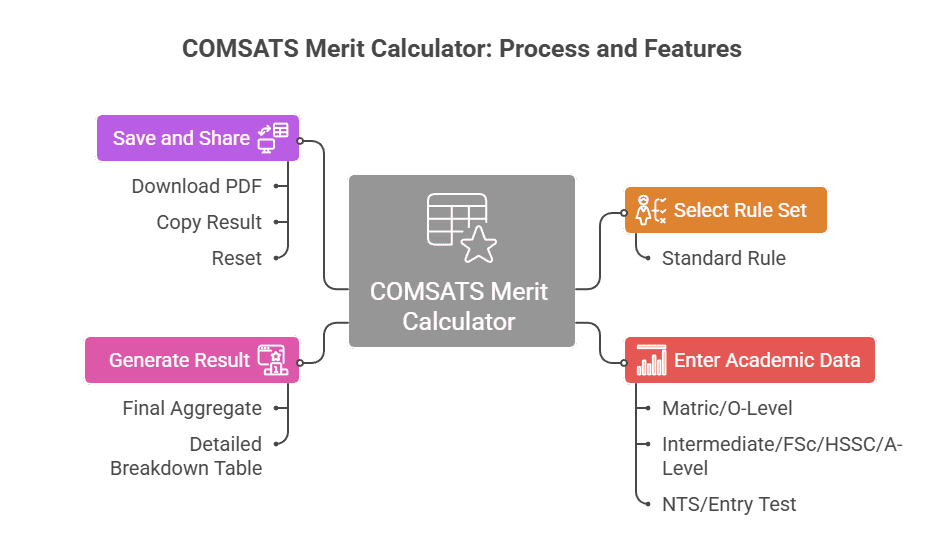
How to Use the COMSATS Merit Calculator
Our Comsat calculator is designed to provide a high-precision breakdown of your academic standing. Unlike basic tools, this version calculates the individual contribution of each academic component toward your final percentage.
Step 1: Select Your Rule Set
Before entering marks, ensure the correct weighting is selected in the “Select Rule Set” dropdown menu.
- Standard Rule: This is the most common weightage for CUI admissions: Matric 10% — Inter 40% — Entry Test 50%.
Step 2: Enter Academic Data
Input your obtained and total marks for the following three categories:
- Matric/O-Level: Enter your total marks (e.g., 1000) and your obtained marks (e.g., 900).
- Intermediate/FSc/HSSC/A-Level: Provide your specific Inter marks. If you are an A-Level student, use your IBCC equivalence scores.
- NTS/Entry Test: Input your NAT score. Note that the tool allows you to specify the “Total Marks” for the test (usually 90 or 100) to ensure mathematical accuracy.
Step 3: Generate the Result
Click the Calculate button. The tool will instantly generate a comprehensive “Result” section featuring:
- Final Aggregate: Your total percentage displayed prominently in blue.
- Detailed Breakdown Table: A table showing the Percentage and Contribution of each component (Matric, Inter, and NTS). For example, a 90% score in Matric contributes exactly 9% to your final 10% weightage.
Step 4: Save and Share Your Aggregate
Once you have your result, you can use the action buttons at the bottom:
- Download PDF: Save a professional copy of your merit breakdown for your records.
- Copy Result: Quickly copy your aggregate to share with counselors or compare with previous years’ merit lists.
- Reset: Clear all fields to calculate a different scenario, such as seeing how a higher NTS score would impact your final merit.
COMSATS Campus and Program Merit Trends
It is a common mistake to assume that one aggregate fits all. COMSATS has multiple campuses, each with its own “Closing Merit.”
Program | Islamabad Campus | Lahore Campus | Sahiwal Campus |
BS Computer Science | ~88% – 91% | ~85% – 88% | ~75% – 80% |
BS Software Engineering | ~86% – 89% | ~84% – 87% | ~72% – 78% |
BS Electrical Eng. | ~78% – 82% | ~75% – 80% | ~68% – 72% |
BS Business Admin. | ~70% – 75% | ~68% – 73% | ~60% – 65% |
Related Academic Calculators
Frequently Asked Questions (FAQs)
No, this is a guidance tool. Official merit is determined only by the university's admission office.
Undergraduate admission is based on the aggregate of SSC, HSSC, and NAT marks, not CGPA.
The Comsats GPA criteria involves a relative or absolute grading system (depending on the year) used to assess semester performance.
While the NAT has a passing score, your goal should be 80+ to stay competitive for high-demand programs like CS.
A Comsats cgpa calculator is generally used by current students to track their degree progress, not for new admissions.
Usually, NAT-ICS, NAT-IE, or NAT-IM are required depending on your background.
Yes, many campuses add 20 marks to the HSSC total for verified Hafiz-e-Quran candidates.
You input your grade points (e.g., A, B+) and the credit hours of each subject to find your semester GPA.
Legal Disclaimer
Please be advised that this Comsat Merit Calculator guide is for informational and educational purposes only. While we strive for 100% accuracy based on historical formulas (10/40/50), COMSATS University Islamabad (CUI) reserves the right to change its admission policy, weightage distribution, and eligibility criteria at any time without prior notice.
The final and official merit lists are issued solely by the COMSATS admission office. We recommend all students download the latest prospectus from the official COMSATS website before making final decisions.