
Table of Contents
ToggleGPA Calculator VIT: Calculate SGPA, CGPA & Percentage
Last Update: December, 2025
Managing your academic performance at the Vellore Institute of Technology (VIT) requires more than just hard work; it requires a strategic understanding of how your grades translate into points. Whether you are a first-year student at the Vellore, Chennai, AP, or Bhopal campus, tracking your progress is vital. Using a GPA Calculator VIT helps you move past the guesswork and provides a clear picture of your academic standing.
In this comprehensive guide, we will break down the VIT grade system, explain the difference between GPA and CGPA, and provide step-by-step instructions on how to calculate your scores manually or using a VIT calculator. We will also address the common confusion regarding the CGPA to percentage conversion and how to plan your future semesters to meet your target goals.
GPA Calculator VIT
Calculate your GPA based on VIT grading system
What the GPA Calculator VIT is and who should use it
A GPA Calculator VIT is a digital tool specifically calibrated to the academic regulations of Vellore Institute of Technology. Unlike a generic CGPA calculator, a VIT-specific tool accounts for the unique letter-grade-to-points mapping used across its campuses.
Who needs this tool?
- Freshers: To understand how their first-semester performance sets the foundation for their degree.
- Placement-Seekers: Most companies visiting VIT for recruitment have a strict CGPA cutoff (often 6.0, 7.0, or 8.0). Students use a VIT calculator to see if they meet these eligibility criteria.
- Scholarship Applicants: Students maintaining high rankings often qualify for “GV School” scholarships or merit-based fee waivers.
- Higher Studies Aspirants: If you are applying for an MS or MBA abroad, you will frequently need to use a CGPA to GPA calculator or a CGPA to percentage converter to fill out international application forms.
Benefits of Using a Calculator vs. Manual Math
Manual calculation involves multiplying grade points by credits for every single subject, summing them up, and dividing by total credits. One small slip in a 2-credit lab or a 4-credit theory course can result in an incorrect GPA. A dedicated VIT grade calculator automates this, providing instant, error-free results that help you focus on your studies rather than the arithmetic.
GPA Calculator VIT: How to use the calculator (inputs and outputs)
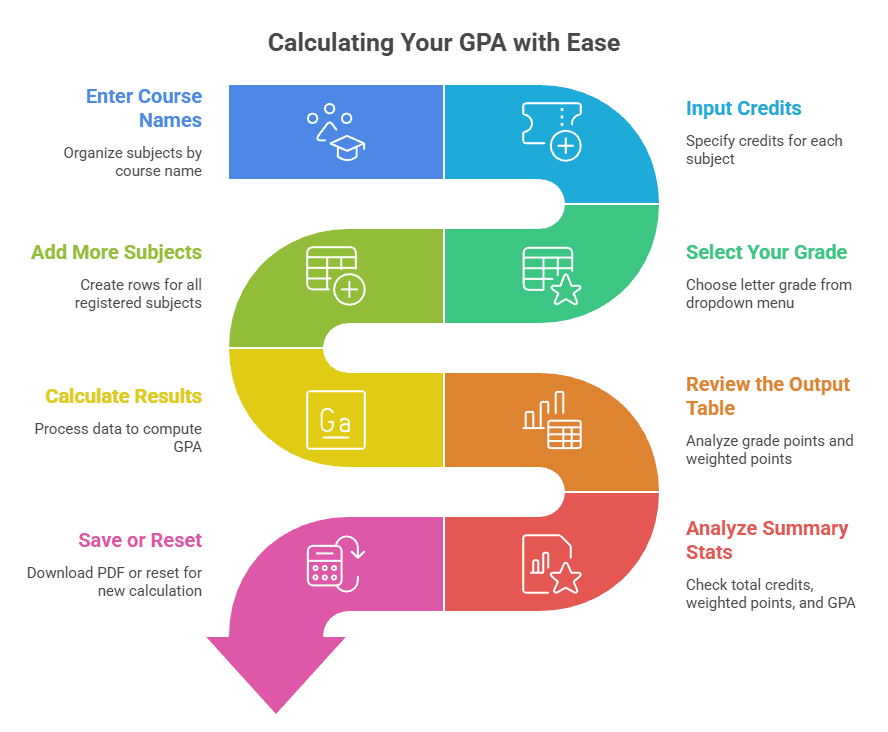
Using our custom GPA Calculator VIT is designed to be intuitive, ensuring your VIT CGPA calculations align perfectly with the FFCS credit-weighted system. Based on the interface shown above, follow these simple steps to calculate your results accurately:
Step-by-Step Tutorial
- Enter Course Names: While optional, entering the “Course Name” for each row helps you organize your subjects according to your consolidated grade sheet.
- Input Credits: Enter the specific credits for each subject in the numeric field (e.g., 2, 3, or 3.5).
- Select Your Grade: Use the dropdown menu to select the letter grade (S, A, B, C, D, E, or F) earned for that course. The VIT calculator automatically assigns the correct grade points (e.g., S=10, A=9) based on official regulations.
- Add More Subjects: Click the “Add Course” button to create additional rows for all the subjects you registered for during the semester.
- Calculate Results: Click the solid blue “Calculate GPA” button to process your data.
- Review the Output Table: The tool will generate a detailed breakdown showing:
- Grade Point: The numerical value of your letter grade.
- Weighted Points: The result of (Credits × Grade Points) for each individual subject.
- Analyze Summary Stats: Below the table, you will see your Total Credits, Total Weighted Points, and your final GPA for the semester.
- Save or Reset: Click “Download PDF” to keep a digital copy of your calculation.
- Use “Copy Result” to quickly paste your GPA into other documents.
- Click “Reset” to clear all fields and start a new calculation for a different semester or batch.
Understanding the Outputs
The GPA Calculator VIT does the heavy lifting by performing the credit-weighted math automatically. For example, as seen in the image, a 3.5-credit course with a ‘B’ grade (8 points) results in 28.00 weighted points. Your final GPA is then derived by dividing the Total Weighted Points by the Total Credits.
How the VIT GPA/CGPA system works (credits, grade points, FFCS basics)
At the heart of VIT’s academic structure is the FFCS (Fully Flexible Credit System). This system allows students to choose their courses, faculty, and time slots, but it also places the responsibility of tracking academic progress on the student. To use a VIT calculator effectively, you must understand three core components:
- Credits: The weightage of a course. A 4-credit course impacts your GPA more than a 2-credit course.
- Grade Points: Numerical values assigned to letter grades.
- SGPA (Semester Grade Point Average): The credit-weighted average of grade points earned in a single semester.
- CGPA (Cumulative Grade Point Average): The credit-weighted average of all courses registered since the first semester.
It is important to note that while the core logic remains similar, specific rules may vary by batch or regulation year. Students should always verify their specific campus rules if they suspect a deviation from the standard FFCS V4.0 regulations.
VIT grade system: letter grades, grade points, and what they mean
The VIT grade calculator logic is built on a specific mapping of letter grades to numerical points. 16161616According to the official VIT Academic Regulations (FFCS Version 4.0), the following table defines the grade points used for calculation:
Table 4: VIT Grade Point Mapping
Performance | Letter Grade | Grade Point |
Outstanding | S | 10 |
Excellent | A | 9 |
Very Good | B | 8 |
Good | C | 7 |
Average | D | 6 |
Pass | E | 5 |
Fail | F | 0 |
No Grade (Attendance) | N | 0 |
Withdrawal | W | Not Counted |
Satisfactory/Unsatisfactory | P / U | Not Counted |
How to calculate SGPA in VIT (step-by-step)
Your SGPA represents your performance in a single semester. To use a CGPA calculator or perform the math manually, follow these steps.
SGPA formula
The formula for SGPA is the sum of the product of credits and grade points, divided by the total number of credits registered in that semester:

Worked example (one semester)
Suppose a student completes 4 courses in their first semester with the following results:
Course | Credits (C) | Grade | Points (G) | C×G |
CSE1001 | 4 | S | 10 | 40 |
MAT1011 | 4 | A | 9 | 36 |
PHY1001 | 3 | B | 8 | 24 |
ENG1001 | 2 | S | 10 | 20 |
Total | 13 | 120 |
Calculation:
SGPA = 120 / 13 = 9.23
How to calculate CGPA in VIT (step-by-step)
CGPA (Cumulative Grade Point Average) is the credit-weighted average of all courses you have registered for since your first semester.
CGPA formula
The CGPA calculation follows the same logic as SGPA but includes all semesters to date:

Worked example (multiple semesters)
Let’s look at a student finishing their second semester:
- Semester 1: 120 Grade Points, 13 Credits (SGPA: 9.23)
- Semester 2: 150 Grade Points, 18 Credits (SGPA: 8.33)
Combined Calculation:
- Total Grade Points: 120 + 150 = 270
- Total Credits: 13 + 18 = 31
- CGPA: 270 / 31 = 8.71
How to calculate the overall CGPA of all semesters (checklist)
When you want to calculate the overall CGPA of all semesters, follow this checklist to ensure no errors:
- Gather your consolidated grade sheet or access your marks via the VIT student portal.
- List every course registered, including those with F or N grades (as they count as 0 points).
- Exclude audit courses or pass-fail courses that do not carry grade points.
- Exclude Minor/Honours courses if you are calculating your primary degree CGPA (confirm with your specific regulation).
- Sum up all (Credits × Grade Points) for all semesters and divide by the total credits earned/attempted.
Convert CGPA to percentage in VIT
Many recruitment processes and higher education applications require you to convert CGPA to percentage. VIT provides a straightforward official rule for this.
CGPA to percentage formula (CGPA × 10) + example
The official VIT conversion formula is:
Percentage (%) = CGPA × 10
Example: If your VIT CGPA is 8.71, your percentage equivalent is:
8.71 × 10 = 87.1%
CGPA to marks calculator: what you can and can’t claim
Students often look for a CGPA to marks calculator, but it is important to understand that VIT uses a grading system rather than a raw marks system. While your percentage is calculated from your CGPA, you cannot “reverse-calculate” your exact total marks from your CGPA because of relative grading or absolute grading adjustments made during the semester. You should only claim the percentage derived from the official CGPA × 10 formula on official documents.
Related Academic Calculators
FAQs (Frequently Asked Questions)
You should sum up all the grade points earned (Credit × Grade Point) from all semesters and divide them by the total number of credits you have registered for across those semesters.
Yes. If you have a backlog course (F grade), the credits remain in your CGPA calculation with 0 points until you clear the course. Once cleared, the new grade replaces the old one in the CGPA calculation, depending on your specific batch regulations.
Generally, the VIT grade system is standardized across all campuses (Vellore, Chennai, AP, and Bhopal) under the FFCS regulations. However, always check your specific campus academic handbook for minor variations.
To convert CGPA to percentage at VIT, simply multiply your CGPA by 10. For example, a 9.0 CGPA is 90%.
This often happens because of the credit weight. If you get a lower grade (like a D or E) in a high-credit course (4 credits), it has a much larger negative impact than a lower grade in a 1-credit lab.
A CGPA to GPA calculator can provide an estimate, but many international universities use a 4.0 scale. VIT provides a 10.0 scale, and most foreign universities will perform their own conversion based on your official transcripts.
VIT uses both. Absolute grading is typically used for smaller classes or specific courses (e.g., S 90%), while relative grading is used for larger batches to account for exam difficulty.
A withdrawal grade (W) does not have grade points and its credits are not counted in the GPA/CGPA denominator. You can simply ignore that course when using your CGPA calculator.
There is no official CGPA to marks calculator because marks are normalized through grading. You should use the percentage equivalence formula (CGPA × 10) instead.
An N grade is given for poor attendance. In your VIT calculator, you must treat an N grade the same as an F grade (0 points), and the credits will still count against your average.
Disclaimer & Academic notes
This GPA Calculator VIT guide and any associated digital tools are intended for academic guidance only. Please note:
- Official grade sheets and VIT Academic Regulations are the final authority on your grades and GPA.
- Rules regarding grade replacement for backlogs, Minor/Honours credits, and specific grading scales can vary by batch, regulation year, and campus.
- Always consult the latest version of the VIT Academic Regulations or your Dean’s office for the most current information.