
Table of Contents
TogglePool Shock Calculator: Get Your Exact Chlorine Dose
Green water, chloramine smell, or a fresh CYA reading all mean one thing: it’s time to shock. A pool shock calculator takes the guesswork out of dosing by converting your pool volume, current chlorine readings, and chosen shock product into an exact amount to add — no more eyeballing scoops or over-shocking your water.
Whether you’re running routine maintenance or fighting a full algae bloom, this swimming pool shock calculator gives you a precise, product-specific dose based on the same breakpoint chlorination math professionals use, making it one of the more practical pool chemistry calculators for everyday pool owners.
Pool Shock Treatment Calculator
Calculate the precise shock dosage for your pool using industry-standard breakpoint chlorination formulas
1
Pool Volume
Enter your pool's dimensions or known volume
Calculated:
2
Current Water Chemistry
Test your pool water before calculating
CC (Combined Chlorine) = Total Chlorine (TC) − Free Chlorine (FC). Enter any two of the three values below.
6.06.57.07.58.08.59.0
3
Shock Product & Treatment Goal
Select your chemical and desired treatment type
Fill in the details on the left and click Calculate to see your results here.
Recommended Dosage
—
—
—
Breakpoint Chlorination Analysis
Water Chemistry Status
Application Instructions
Safety Reminders
Reset Calculator?
This will clear all inputs, results, and saved session data. This action cannot be undone.
Copied to clipboard!
To calculate pool shock amount, you need three inputs: your pool volume in gallons, your current free chlorine (FC) reading, and your target shock level in ppm. The general formula is:
Ounces of shock product = (Target ppm − Current ppm) × Pool Gallons × 0.00013 ÷ Available Chlorine %
For example, a 20,000-gallon pool going from 1 ppm to 25 ppm (heavy algae treatment) using 68% cal-hypo needs roughly 5.75 lbs of product. How much pool shock you need always depends on your specific volume, current chlorine, and product strength — which is exactly what the calculator above solves for automatically.
How to Use the Pool Shock Calculator
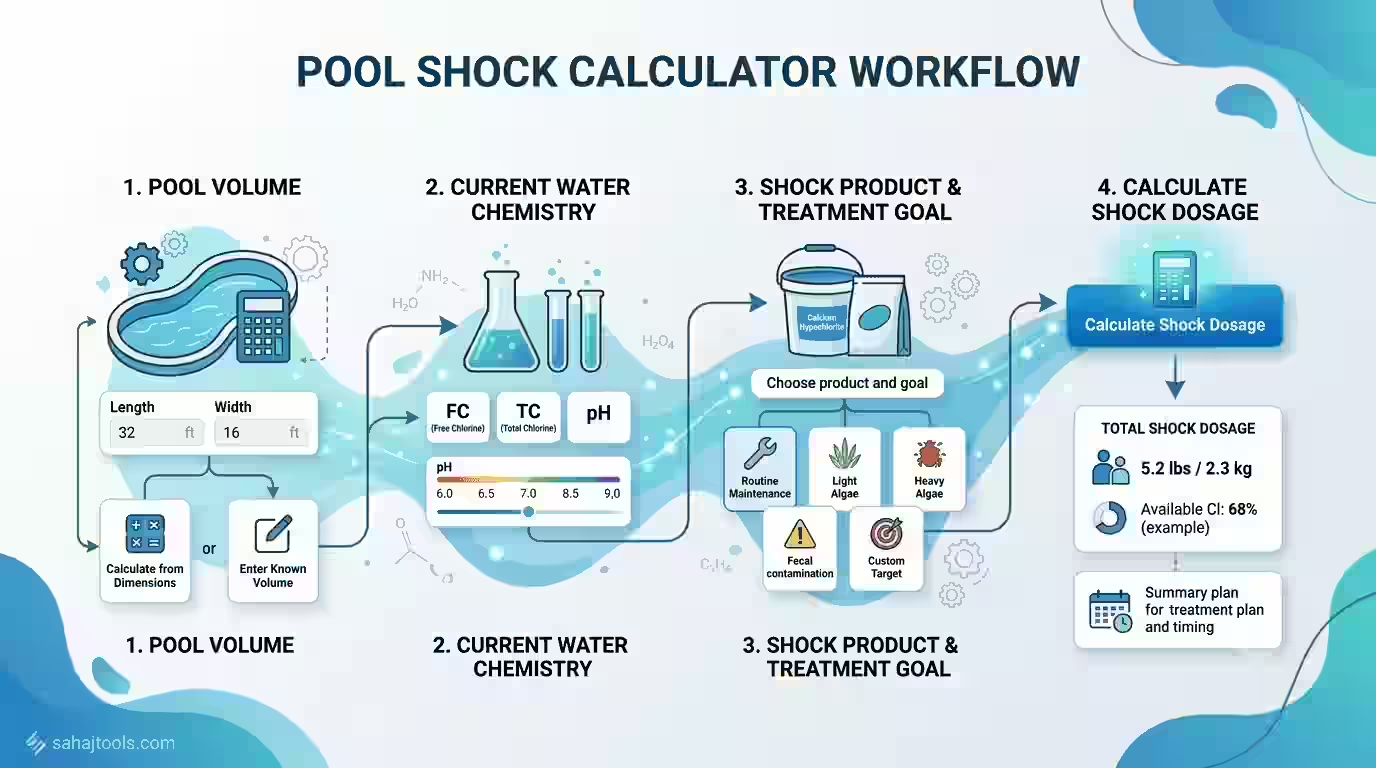
The calculator walks through three clearly labeled sections before generating your dose. Follow these steps for accurate pool shock instructions every time:
- Enter your pool volume. Choose “Calculate from Dimensions” and select your pool shape (rectangular, round, oval, etc.), then enter length, width, and shallow/deep end depth in feet. If you already know your volume, switch to “Enter Known Volume” instead. Click Calculate Volume.
- Input your current water chemistry. Enter Free Chlorine (FC) and Total Chlorine (TC) — the calculator automatically derives Combined Chlorine (CC), since CC = TC − FC. Add your current pH and Cyaunric Acid (CYA) reading from a recent test strip or liquid test kit.
- Select your shock product and treatment goal. Choose your chemical type from the dropdown (for example, Calcium Hypochlorite 68%, which shows its available chlorine percentage and handling notes). Then pick a treatment goal: Routine Maintenance, Light Algae, Heavy Algae, Fecal/Contamination, or Custom Target if you have a specific ppm in mind.
Click Calculate Shock Dosage, and the tool returns the exact weight or volume of product to add based on your pool’s real numbers.
Chemical Safety Note: Always follow the dosage on your product label. Add chemicals to water, never water to chemicals, and never mix different pool chemicals together. Wear gloves and eye protection, and test your water before and after dosing.
Understanding the Target Level
“Shock level” isn’t one fixed number — it depends on why you’re shocking:
- Routine Maintenance: Free chlorine should reach at least 10× your combined chlorine (CC) reading, or a minimum of 10 ppm, whichever is higher. This breakpoint chlorination threshold is what actually oxidizes chloramines rather than just adding more chlorine on top of them.
- Light Algae: Target roughly 15 ppm FC.
- Heavy or Green Algae: Target 20–30 ppm FC, sometimes called super chlorination.
- Fecal/Contamination Events: Public health guidance (referenced in the CDC’s Model Aquatic Health Code) recommends raising free chlorine to around 20 ppm and maintaining it for approximately 12.75 hours at a controlled pH before swimmers re-enter.
- Custom Target: Enter your own ppm goal — useful for SLAM method treatments, which typically hold FC at CYA-proportional levels for several days to clear a stubborn algae or chloramine problem.
Your cyanuric acid level directly affects the free chlorine target: higher CYA “shades” chlorine from UV light but also weakens its sanitizing strength, so pools with elevated CYA generally need a proportionally higher FC target to reach true breakpoint and clear chloramines effectively.
The Dosing Formula and Product Table
The calculator uses a standard chlorine dosing formula based on pool volume, desired ppm increase, and the available chlorine percentage of your chosen product:
Ounces needed = (ppm increase) × (pool gallons) × 0.00013 ÷ (available chlorine as a decimal)
This constant comes from converting a 1 ppm rise across a given water volume into weight, using water’s standard density. Available chlorine percentage varies significantly by product, which is why entering the correct one matters:
Shock Product | Typical Available Chlorine | Notes |
Liquid Chlorine (Sodium Hypochlorite) | 10–12% | No CYA added; large volume needed per ppm |
Calcium Hypochlorite (Cal-Hypo) | 65–73% | Raises calcium hardness; pre-dissolve before adding |
Dichlor | 56–62% | Adds CYA with each use; good for spot-treating |
Lithium Hypochlorite | ~35% | Dissolves quickly, no calcium impact |
Because a liquid chlorine shock calculator and a cal-hypo shock calculator will return very different weights or volumes for the same ppm target, always confirm the available chlorine percentage on your specific product label before dosing.
Step-by-Step Worked Example
Say you have a 20,000-gallon pool with a current FC of 1 ppm, and you’re treating heavy algae with a target of 25 ppm using 68% cal-hypo.
- ppm increase = 25 − 1 = 24 ppm
- Ounces = 24 × 20,000 × 0.00013 ÷ 0.68
- Ounces = 480,000 × 0.00013 ÷ 0.68 = 62.4 ÷ 0.68 ≈ 91.8 oz
- Convert to pounds: 91.8 ÷ 16 ≈ 5.75 lbs of cal-hypo
Pre-dissolve the calculated amount in a bucket of water per the product label, then broadcast it evenly around the pool with the pump running.
When to Re-test and Re-dose
Retest free chlorine 30–60 minutes after adding shock to confirm it reached target, since some chlorine is consumed immediately by organic contaminants. For algae or SLAM treatments, retest FC every few hours and re-dose as needed to hold the target level — this is where an overnight chlorine loss test helps: measure FC before bed and again the next morning. A large overnight drop usually signals the pool isn’t yet at true breakpoint and needs another dose before you can trust routine readings again. Once FC holds steady overnight and water clears, pool water balance (pH, alkalinity, CYA) should be rechecked before returning to a normal chlorine routine.
Troubleshooting
- Water still cloudy after shocking: Run the filter continuously, brush the pool, and retest — cloudy pool chlorine dose issues often mean the shock hasn’t reached breakpoint yet or a filter needs backwashing.
- Green pool treatment not clearing: Very high CYA can make breakpoint chlorination nearly impossible; a partial water drain to lower CYA may be required before shock will work effectively.
- Chlorine smell persists: A strong chemical odor usually indicates chloramines, not “too much chlorine” — this is a signal to shock higher, not lower.
- FC won’t hold pool sanitizer level: High chlorine demand from algae, sunlight (low or no stabilizer), or heavy bather load can all cause rapid chlorine loss; re-dose and retest more frequently until demand drops.
FAQ – Pool Shock Calculator
Multiply your pool's gallons by the ppm increase you need and by 0.00013, then divide by your product's available chlorine percentage. The calculator does this automatically once you enter your volume and current reading.
Higher CYA requires a proportionally higher free chlorine target to reach breakpoint. As a general rule of thumb, many pool professionals target free chlorine around 40% of the CYA reading or higher during a SLAM-style treatment.
Determine the ppm increase needed (target minus current FC), then use the dosing formula with your pool's gallons and your product's available chlorine percentage to convert that ppm into a weight or volume.
Liquid chlorine adds no CYA and works well for pools with already-high stabilizer; cal-hypo is strong and affordable but raises calcium hardness; dichlor dissolves fast and is convenient for smaller spot doses but adds CYA over time.
Test CYA first, then dose to reach breakpoint chlorination (often 20–30+ ppm FC), run the filter continuously, brush daily, and retest every few hours until the water clears and FC holds steady overnight.
Maintain the calculated shock-level FC continuously — retesting and re-dosing as needed — until water is clear, CC is at or near zero, and an overnight chlorine loss test shows minimal FC drop.
CYA binds to chlorine and reduces its sanitizing strength, so a pool with high CYA needs more free chlorine to achieve the same breakpoint effect as a pool with low or no CYA.
You need free chlorine, total chlorine (to derive combined chlorine), pH, and cyanuric acid at minimum — all of which feed directly into the calculator's dosing formula.
Yes — the same breakpoint chlorination principle treats both. Chloramines typically need FC to reach 10× the CC reading, while algae usually requires a higher, sustained FC target over one or more days.
12% liquid chlorine) requires proportionally more product volume than a higher-strength option like 65–73% cal-hypo to achieve the same ppm increase.
Shocking a pool correctly comes down to three numbers: your accurate pool volume, your current chlorine reading, and the right target level for your situation. This pool shock calculator handles the math — including product-specific available chlorine percentages — so you can dose confidently instead of guessing. Always follow your product label, retest before swimmers return, and re-dose as needed until your water holds a stable, clear result.
Last Update: July 2026