
Table of Contents
TogglePool Chemical Calculator: Get Exact Dosing in Seconds
Balancing pool water comes down to one question: how much of each chemical does your pool actually need? A Pool Chemical Calculator answers that instantly. Enter your pool volume, your current test strip or test kit readings, and your target levels — the calculator returns precise chlorine, pH, alkalinity, calcium hardness, and cyanuric acid dosing, plus a Langelier Saturation Index (LSI) score that tells you whether your water is corrosive, scale-forming, or balanced.
For a typical 15,000-gallon pool testing low on chlorine (0.5 ppm) with a target of 2 ppm free chlorine, the calculator would recommend roughly 19 fl oz of 10% liquid chlorine (or the equivalent in cal-hypo/dichlor tablets) — the exact number depends on your product’s concentration, which the calculator adjusts for automatically.
Professional Pool Chemistry Tool
Pool Chemical CalculatorPrecision water chemistry analysis with LSI scoring, exact dosage formulas, and actionable recommendations — for residential owners and professional technicians.
LSILangelier Index
8+Parameters
NSPFStandard Ranges
PDFExport Ready
🏊 Pool Volume
Quick Presets (US Gallons)
Please enter a valid pool volume (100 – 5,000,000 gal).
🔬 Current Water Test Results
Enter pH between 6.5 and 9.0
Enter TA between 0 and 800 ppm
Enter CH between 0 and 2000 ppm
Enter CYA between 0 and 300 ppm
Enter FC between 0 and 20 ppm
Enter TC between 0 and 20 ppm
Enter temperature between 32 and 120°F
🎯 Target Levels (leave blank to use NSPF defaults)
📊 Langelier Saturation Index (LSI)
0.00
Calculating…
−0.5 Corrosive0.0 Ideal+0.5 Scaling
🧪 Parameter Status
⚗️ Required Chemical Adjustments
⚠ Chemical Safety Guidelines
- Always add chemicals to water — never add water to chemicals.
- Pre-dissolve granular chemicals in a bucket of pool water before broadcasting.
- Allow 4–6 hours of circulation between adding different chemicals.
- Add chemicals with the pump running for proper distribution.
- Do not swim for at least 30 minutes after chemical additions (longer for acid/shock).
- Store chemicals in a cool, dry location away from sunlight and heat sources.
- Never mix different chemicals together — always add separately.
- Retest water 24 hours after any chemical addition to confirm results.
Reset All Data?
This will clear all inputs, calculated results, and saved session data. This action cannot be undone.
related Pool & Aquatic calcualtors
For a 15,000-gallon pool at NSPF-standard targets (pH 7.4–7.6, TA 80–120 ppm, CH 200–400 ppm, CYA 30–50 ppm, FC 1–3 ppm), here’s what a common correction looks like:
- Raise free chlorine by 1 ppm: ≈ 10 fl oz of 10% liquid chlorine
- Raise pH from 7.0 to 7.4: ≈ 6 oz of soda ash (sodium carbonate)
- Raise total alkalinity by 10 ppm: ≈ 1.4 lb of baking soda (sodium bicarbonate)
- Lower pH from 7.8 to 7.4: ≈ 8 fl oz of muriatic acid
These are reference figures only — your exact numbers change with pool size and product strength, which is exactly what the pool chemistry calculator solves for.
How to Use the Pool Chemical Calculator
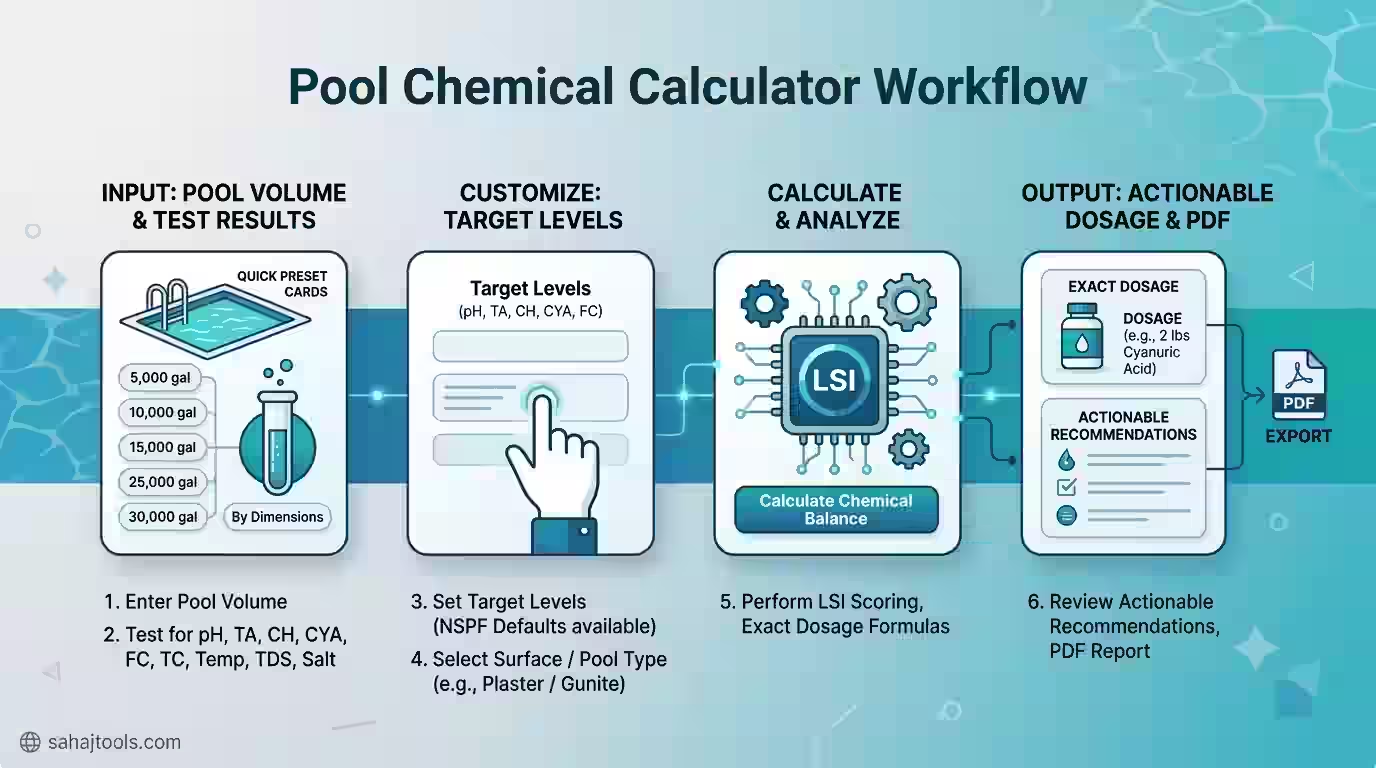
The calculator interface is organized into three input blocks and one action button, making it fast to run a full water-balance check:
- Enter your pool volume. Choose a quick preset (5,000–30,000 gallons) or click “By Dimensions” to calculate volume from length, width, and depth. Type your exact gallon count in the “Pool Volume (US Gallons)” field if you already know it.
- Input your current test results. Under “Current Water Test Results,” enter your pH, Total Alkalinity (ppm), Calcium Hardness (ppm), Cyanuric Acid (ppm), Free Chlorine (ppm), and Total Chlorine (ppm) straight from your test strip or liquid test kit. Add Water Temperature (°F) — required for accurate LSI scoring — plus optional TDS and Salt readings if you own a saltwater pool.
- Set your target levels (optional). Leave the “Target Levels” fields blank to auto-apply NSPF standard ranges, or enter custom targets for pH, TA, CH, CYA, and FC. Select your pool surface type (Plaster/Gunite, Vinyl, Fiberglass, etc.), since surface material affects LSI interpretation.
- Click “Calculate Chemical Balance.” The calculator instantly returns your LSI score, flags any parameter outside the safe range, and generates exact dosing amounts to reach your target for each chemical.
Safety Note: Read Before You Dose
Chemical Safety Note: Always follow the dosage instructions on your product label — treat the calculator’s output as guidance, not a replacement for label directions. Always add chemicals to water, never water to chemicals. Never mix different pool chemicals together, even briefly. Wear gloves and eye protection when handling pool chemicals, and dose in a well-ventilated outdoor area. Test your water before and after dosing to confirm the correction worked.
Understanding Your Target Levels
Every reading on the calculator maps to a standard, published range. These are general guidelines — always confirm against your own test kit and product label before dosing, since test methods and local water conditions vary.
Parameter | Standard Range (NSPF) | What It Affects |
Free Chlorine (FC) | 1–3 ppm | Sanitization, algae/bacteria control |
pH | 7.2–7.6 | Swimmer comfort, chlorine effectiveness, equipment corrosion |
Total Alkalinity (TA) | 80–120 ppm | pH stability (“pH buffer”) |
Calcium Hardness (CH) | 200–400 ppm | Scaling vs. corrosion risk |
Cyanuric Acid (CYA) | 30–50 ppm | Chlorine protection from UV breakdown |
Water Temperature | 76–84°F | LSI calculation input |
This is also where a Langelier Saturation Index (LSI) pool calculator earns its keep. LSI combines pH, TA, CH, TDS, and temperature into a single score that tells you whether water is likely to corrode metal/plaster (LSI below −0.3) or deposit scale (LSI above +0.3). A calcium saturation index (CSI) reading works the same way and is especially relevant for saltwater and fiberglass pools. Balanced water sits close to LSI 0.0.
The Dosing Formula
Pool chemical dosing follows the same basic logic across chlorine, pH, alkalinity, calcium, and stabilizer — only the chemical-specific factor changes:
Dose (oz or lb) = Pool Volume (gallons) ÷ 10,000 × Chemical Factor × ppm Change Needed
The “Chemical Factor” is published by the product manufacturer or a standard pool chemistry dosing chart (never invented or estimated) and varies by product concentration — 10% liquid chlorine doses differently than cal-hypo or dichlor, and granular soda ash doses differently than liquid pH-up. This is why a pool chemical dosage calculator that accounts for your specific volume and product type is far more accurate than a generic dosing chart.
Step-by-Step Worked Example
Say you’re running a 20,000-gallon in-ground plaster pool. Your test kit shows:
- pH: 7.1 (target 7.4)
- Free Chlorine: 1 ppm (target 3 ppm)
- Total Alkalinity: 70 ppm (target 100 ppm)
Step 1 — Raise chlorine by 2 ppm: Using 10% liquid chlorine, the calculator applies the standard factor for that concentration and volume, returning roughly 51 fl oz of liquid chlorine.
Step 2 — Raise pH from 7.1 to 7.4: With soda ash, this pulls roughly 12 oz, added slowly across the pool’s return jets to avoid clouding.
Step 3 — Raise TA by 30 ppm: Baking soda dosing at this volume comes out to roughly 8.4 lb, added over the deep end.
Step 4 — Wait and retest: Circulate for at least 4–6 hours, then retest before adding anything further — chemicals need time to fully disperse and react.
These figures illustrate the formula in action; always let the calculator run your exact volume, product concentration, and current readings rather than reusing example numbers.
When to Re-Test and Re-Dose
Retest 4–6 hours after dosing chlorine or pH adjusters, and 24 hours after alkalinity or calcium hardness corrections, since those changes take longer to stabilize. As a maintenance routine, most residential pools should be tested 2–3 times per week during swim season, and immediately after heavy rain, high bather load, or a shock treatment. Re-enter your fresh readings into the calculator each time — this is the core habit behind a reliable pool maintenance dosing calculator workflow, rather than a one-time fix.
Troubleshooting Common Water Issues
- Cloudy water usually points to low free chlorine, high pH, poor filtration, or high CYA “locking” your chlorine’s effectiveness — check FC and CYA first. A pool shock calculator approach (dosing to 10x your CYA level in free chlorine, a technique called breakpoint chlorination) typically clears it within 24 hours.
- Persistent algae despite adequate chlorine often means CYA has crept too high (above 80–100 ppm), reducing chlorine’s killing power — a partial drain-and-refill is usually the fix, not more chlorine.
- Eye or skin irritation is more often caused by unbalanced pH or combined chlorine (chloramines) than by chlorine itself — check both FC and Total Chlorine; a gap between the two signals chloramines needing a shock treatment.
- Scale or cloudy-white deposits point to a high LSI/CSI reading — usually elevated calcium hardness, high pH, or high TA together. Lowering pH with muriatic acid and rechecking LSI is the standard first step.
- Metal staining or pitted plaster signals a low, corrosive LSI — raise TA and CH toward the target range rather than adjusting pH alone.
- Saltwater pool owners should also keep salt readings between 2,700–3,400 ppm; both a pool salt calculator and this tool’s optional salt field help confirm your salt cell is operating in its intended range.
Frequently Asked Questions
Enter your pool volume and current test readings (pH, TA, CH, CYA, FC) into the calculator, along with your target levels. It compares the two and applies published dosing factors for your chosen chemical products to return exact amounts needed to close the gap.
As a general rule, 10% liquid chlorine dosed at roughly 1 fl oz per 2,500 gallons raises free chlorine by about 1 ppm, but exact amounts depend on your product's concentration and current CYA level. Use the calculator with your specific gallons and readings for an exact figure.
Raise pH with soda ash (sodium carbonate) added slowly near return jets; lower pH with muriatic acid poured in front of a return, never near the skimmer. Always add chemicals to water, wear gloves and eye protection, and retest 4–6 hours later before adjusting further.
The Langelier Saturation Index measures whether water will corrode surfaces or form scale, based on pH, alkalinity, calcium hardness, TDS, and temperature. An LSI pool calculator combines your test readings into one score — near 0.0 is balanced, below −0.3 is corrosive, above +0.3 risks scaling.
Rectangular pools: length × width × average depth × 7.5. Round pools: diameter² × average depth × 5.9. Oval and kidney-shaped pools use adjusted multipliers for their irregular area. The calculator's "By Dimensions" option handles all shapes automatically.
Test 2–3 times per week during regular swim season, and immediately after heavy rain, a pool party, or shock treatment. Re-enter fresh readings into the calculator each time, since chemical levels drift with sunlight, bather load, and evaporation.
A Pool Chemical Calculator turns test-strip numbers into an exact, safe dosing plan — no guesswork, no generic charts. Enter your volume and current readings, compare against NSPF-standard or custom targets, and get precise chlorine, pH, alkalinity, calcium hardness, and LSI corrections in one pass. Retest regularly, follow the safety note on every dose, and re-run the calculator each time your water chemistry shifts.
Last Update: July 2026