
Table of Contents
ToggleAquarium Water Change Calculator: Exact Gallons, Fast
Wondering exactly how much water to change to bring nitrate, ammonia, or phosphate down to a safe level? The Aquarium Water Change Calculator uses a simple dilution formula — your tank volume, current pollutant reading, and target level — to tell you precisely how many gallons or liters to remove and replace. Enter your tank size and current test-kit numbers below, and the calculator does the rest, including whether one change gets you there or whether you’ll need to repeat the process over several sessions.
AWACCAquarium Water Change Calculator
Scientifically accurate. Professionally presented. Built for the serious aquarist.
01Tank & Water Volume
Gross tank volume including substrate displacement
L
Leave blank to auto-estimate (90% of tank volume)L
Volume of water you remove and replace each sessionHow often you perform water changes
02Current Pollutant Levels (optional)
ppm
Target: <10 ppm reef / <20 ppm freshwaterppm
Target: <0.03 ppm reef / <0.1 ppm freshwaterppm
Target: 0 ppm (any level is harmful)ppm
Target: 0 ppm (toxic to fish)ppt / ppm
Salinity in ppt (saltwater) or TDS in ppm (freshwater)ppm
Nitrate in your tap/RO water (0 for RO/DI)03Advanced Options▸Click to expand
Consecutive water changes (bucket method, etc.)
weeks
Forecast pollutant levels over this periodppm/week
Biological nitrate generation in your tank per weekAdjusts recommended target thresholds
Results Summary—
Effective Water Change—% per session
Old Water Remaining—% after change
Monthly Equivalent—% total per 30 days
Steady-State Dilution—% pollution reduction
Water Volume Changed—L per session
Annual Water Usage—L per year
Pollutant Level Forecast
| Parameter | Current | After 1 Change | After 4 Weeks | Status | Target |
|---|
Multiple Changes Per Session
| Change # | Effective % (cumulative) | Old Water Remaining % | Volume Changed |
|---|
Nitrate Projection Over 4 Weeks
Smart Recommendations
Confirm Reset
This will clear all inputs and calculated results. Are you sure?
Most aquarists either guess at a percentage (10%, 25%, 50%) or blindly follow a generic “weekly water change” rule without checking whether it actually matches their tank’s bioload. This tool replaces the guesswork with an aquarium water change calculation grounded in the same dilution math used across freshwater community tanks, high-tech planted setups, and reef systems.
For a standard 55-gallon freshwater community tank running 40 ppm nitrate with a target of 20 ppm, changing 50% of the water volume (about 27.5 gallons) brings you close to the target in a single session, assuming your source water carries minimal nitrate. The underlying aquarium nitrate dilution formula is:
New Concentration = Current Concentration × (1 − Water Change Fraction) + (Source Water Concentration × Water Change Fraction)
Rearranged, you can solve for the water change fraction needed to hit a specific target — which is exactly what this calculator automates.
How the Aquarium Water Change Calculation Works
Every water change is really a dilution problem. You’re mixing old, polluted water with new water that (ideally) has a much lower nitrate, ammonia, or phosphate concentration. The math tracks three numbers:
- Current level — what your test kit reads right now (nitrate, ammonia, nitrite, phosphate, or TDS/salinity)
- Source water level — the pollutant level already present in your tap or RO/DI water before it goes in the tank
- Target level — the safe or desired concentration you’re trying to reach
This is the same target parameter calculator logic used across dosing and dilution tools: you’re not just picking an arbitrary water change percentage; you’re solving for the volume that actually gets your water chemistry where it needs to be.
Worked Example
Say your 100-gallon tank tests at 60 ppm nitrate, your tap water carries 5 ppm nitrate, and your target is 15 ppm.
- Difference to close: 60 ppm → 15 ppm
- Applying the dilution formula, you’d need to change roughly 69% of the tank volume — about 69 gallons — in a single change to hit that target, assuming no further nitrate production between now and the test.
- If a 69% change feels too aggressive for your fish, the calculator will also show you the two-step path: two smaller changes (say, 40% then 40%) that land at nearly the same result with far less shock to the tank.
This is why the tool asks for changes per session — the bucket method, where you do several partial changes back-to-back, is common for large corrections and is gentler than one enormous change.
How to Use the Aquarium Water Change Calculator
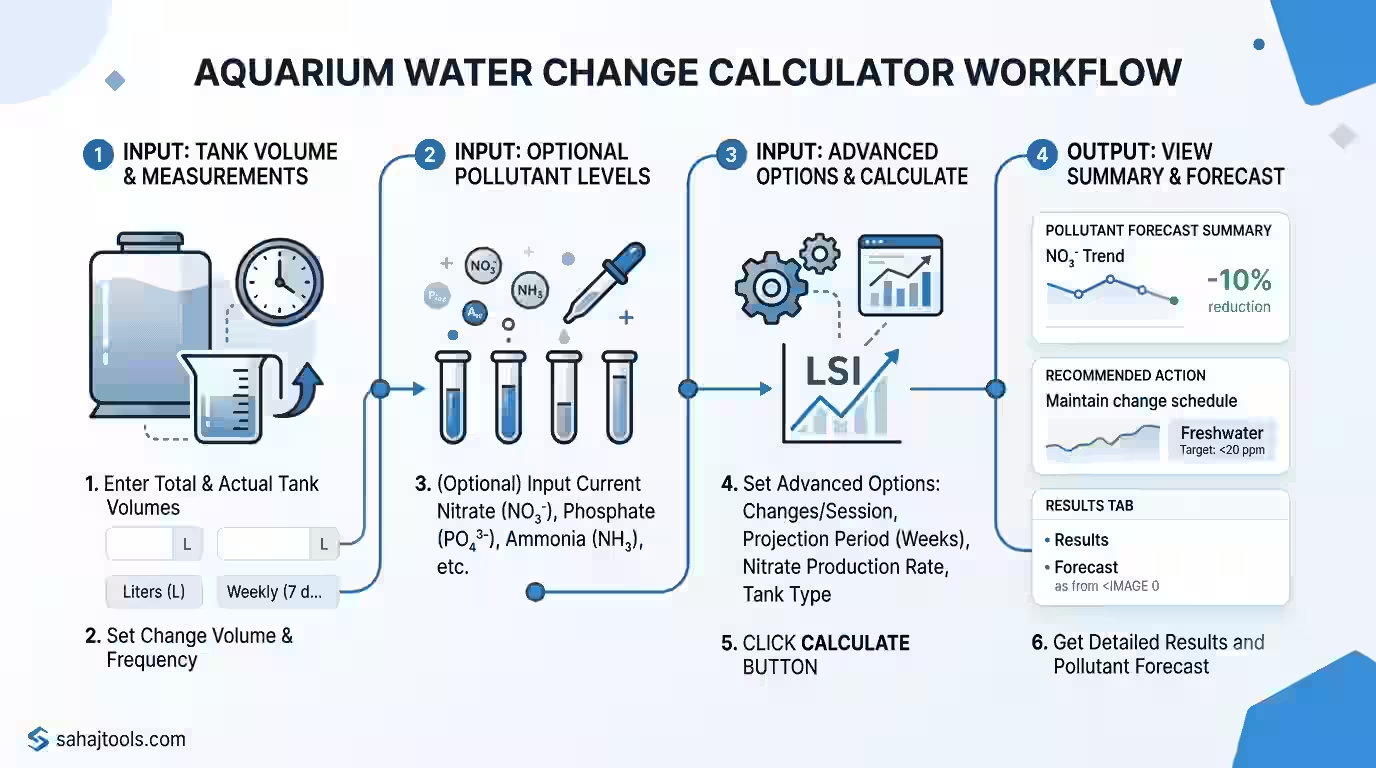
- Enter your Total Tank Volume and select the unit (Liters or Gallons). This should be the tank’s gross volume, including the space displaced by substrate and decor.
- Add your Actual Water Volume if you know it — or leave it blank and the calculator will auto-estimate it at roughly 90% of your gross tank volume, since it doesn’t yet account for what your rocks, sand, and hardscape have pushed out.
- Enter your Water Change Volume — the amount you typically remove and replace in one session — and set your Change Frequency (for example, weekly on a 7-day cycle).
- Fill in your Current Pollutant Levels where you have test-kit data: nitrate, phosphate, ammonia, nitrite, and TDS/salinity. All of these fields are optional, but the more you provide, the more complete the projection.
- Enter the Pollutant Level in New Water — your tap or RO/DI source reading — so the calculator can account for nitrate or other pollutants already present before the change.
- Open Advanced Options to refine the result further: set Changes Per Session if you’re doing the bucket method, choose a Projection Period (in weeks) to forecast pollutant buildup, add a Nitrate Production Rate if your tank is heavily stocked and generates nitrate quickly, and select your Tank Type (freshwater or reef) so the calculator applies the correct target thresholds.
- Tap Calculate to see your recommended water change volume, the resulting pollutant level, and whether you’ll need multiple changes to reach your target.
Stocking Density and Bioload: Why Your Water Change Needs Vary
The right weekly water change percentage for aquariums isn’t one-size-fits-all — it depends heavily on bioload: how many fish you keep, how much and how often they’re fed, and how efficiently your filter and plants process waste. A lightly stocked, well-planted tank might comfortably run on a 10–15% weekly change, while a heavily stocked or messy-eater setup can need 25–30% or more just to keep nitrate from creeping upward between sessions.
As a general rule of thumb (species and setup vary, so always check your own fish’s specific needs):
Tank Type | Typical Bioload | Suggested Weekly Change |
Lightly stocked freshwater community | Low | 10–15% |
Standard freshwater community tank | Moderate | 20–25% |
Heavily stocked or messy-eater tank | High | 25–40% |
High-tech planted tank (EI method) | High (nutrient-driven) | 40–50%+ |
Reef tank (nutrient export focus) | Variable | 10–20%, paired with skimmer/refugium |
High-tech planted tanks running the Estimative Index (EI) fertilization method often deliberately schedule a large weekly water change — not because the tank is overstocked, but to reset accumulated fertilizer salts and prevent nutrient lockout. Reef tanks, meanwhile, usually rely on a combination of protein skimming, refugium filtration, and smaller, more frequent water changes to manage nutrient export while protecting the delicate salinity and alkalinity balance corals need.
Tank Volume vs. Working Water Volume
One of the most common sources of error in an aquarium water change calculation is confusing gross tank volume with actual working water volume. A 55-gallon tank rarely holds 55 gallons of water — substrate, rockwork, driftwood, and equipment typically displace 5–15% of that volume. That’s why the calculator lets you enter your actual water volume separately, or defaults to a 90% estimate when you leave it blank. Getting this number right matters more than it seems, since every dose or dilution calculation downstream is only as accurate as the water volume you feed into it.
Continuous vs. Weekly Water Changes
Not every aquarist changes water on a weekly schedule. Automated continuous water change systems — a slow drip-in of fresh water paired with a matching drip-out or overflow — spread the same total volume change across the entire week instead of one large session. Mathematically, this achieves a similar long-term average nitrate level to a single weekly change of the same total volume, but with smaller, gentler swings in water chemistry. If you’re comparing the two, use this calculator’s projection period to see the difference between one large weekly correction and the same volume split across daily doses.
Protecting Beneficial Bacteria During Larger Water Changes
Water changes remove dissolved pollutants, but they don’t meaningfully disrupt the beneficial bacteria colonizing your filter media and substrate — those biofilms stay put unless you’re aggressively cleaning or replacing filter material at the same time. That said, very large or very frequent changes can still stress fish through rapid shifts in temperature, pH, or hardness (GH/KH), even when nitrate drops safely. Match new water temperature closely to tank temperature, and avoid combining a large water change with a full filter clean on the same day.
Common Mistakes When Calculating Water Changes
- Ignoring source water pollutant levels. If your tap water already carries 20 ppm nitrate, changing water won’t dilute nitrate as effectively as you’d expect — this is a common reason reef keepers switch to RO/DI water.
- Using gross tank volume instead of working volume. This overstates how much water you’re actually changing and how much dilution you’re getting.
- Chasing a target in one oversized change. A sudden, very large water change can shock fish through fast parameter swings — smaller sequential changes are often safer for a big correction.
- Not accounting for ongoing nitrate production. A heavily stocked tank keeps generating nitrate between water changes; the Nitrate Production Rate field helps project that buildup.
- Skipping the test kit. Any water change plan is only as good as the numbers feeding it — always confirm nitrate, ammonia, GH, and KH with a test kit before and after dosing changes.
Fish & Livestock Welfare Note: Stocking and water-change guidelines here are general starting points. Always check the care requirements of your specific fish or plant species before finalizing stocking levels or making large parameter changes.
frequently asked questions (FAQs)
Most freshwater community tanks do well with 20–25% weekly, but lightly stocked tanks can use 10–15%, while heavily stocked or planted tanks may need 25–50%. Use your current nitrate reading against your target to calculate the exact percentage for your tank.
Up to 50% is generally considered safe for most established freshwater tanks when new water is temperature- and parameter-matched. Reef tanks typically use smaller, more frequent changes (10–20%) to protect salinity stability.
Multiply your actual working water volume (not gross tank volume) by 0.25. For a 100-gallon tank with 90 gallons of actual water, a 25% change means removing about 22.5 gallons.
Enter your current nitrate reading, source water nitrate, and target level into the calculator's dilution formula. It solves for the exact water change percentage needed, accounting for whatever nitrate your tap or RO/DI water already contains.
It depends on how large the gap is. Closing a big gap (say 80 ppm to 10 ppm) in one change often requires an unsafely large volume, so the calculator can show you a multi-step "changes per session" plan instead.
Beneficial bacteria live mainly in your filter media and substrate, so they're largely unaffected by volume changes. Fish stress instead comes from rapid temperature or parameter swings, so match new water closely before a large change.
The Aquarium Water Change Calculator turns a routine guessing game into a precise dilution calculation. By entering your tank volume, current pollutant levels, source water quality, and target parameters, you get an exact water change volume — plus a clear read on whether you need one change or several — so you can protect your fish, your plants, or your reef without over- or under-correcting.
Last Update: July 2026