
Table of Contents
ToggleIFTA Calculator
Filing your quarterly International Fuel Tax Agreement return means reconciling miles driven and fuel purchased across every jurisdiction your fleet touched. This IFTA calculator turns those raw numbers into a jurisdiction-by-jurisdiction tax breakdown, so you know exactly what you owe — or what credit you’re due — before you file.
IFTA CalculatorInternational Fuel Tax Agreement — Quarterly Filing Tool
01
Fleet & Quarter Information
Enter your company details and the reporting quarter for this IFTA return.
Optional — appears on PDF report
Truck or trailer identifier
IFTA license or plate number
02
Miles & Fuel by Jurisdiction
Enter the total miles traveled and gallons purchased in each jurisdiction. Add as many jurisdictions as needed.
JurisdictionMiles TraveledGallons PurchasedTax Rate (¢/gal)
Total Miles0
Total Gallons Purchased0.000
Fleet MPG—
All jurisdictions must have a valid state and mileage entry.
IFTA Calculation Results
Per-Jurisdiction Breakdown
| Jurisdiction | Miles | % Miles | Taxable Gallons | Gallons Purchased | Net Gallons | Tax Rate | Tax Due / (Credit) |
|---|
How This Was Calculated
Disclaimer: This tool provides estimates based on standard IFTA formulas. Always verify tax rates with official jurisdiction authorities. Tax rates used are indicative averages — consult your state/province IFTA office for current rates. Not a substitute for professional tax advice.
© IFTA Calculator · Professional Fuel Tax Tool
Reset Calculator?
This will permanently clear all entries, results, and saved session data. This action cannot be undone.
related automotive & transport calculators
How to Use This IFTA Calculator
- Enter your carrier name, unit ID, and IFTA license or plate number (optional, but useful if you’re generating a PDF report for your records).
- Select the reporting quarter and year.
- Choose your fuel type — diesel, gasoline, propane, or another IFTA-qualified fuel.
- Add a row for each jurisdiction you drove in during the quarter, entering miles traveled and gallons purchased for that state or province.
- Confirm or adjust the tax rate per gallon for each jurisdiction (rates change quarterly, so double-check against the current IFTA tax rate matrix).
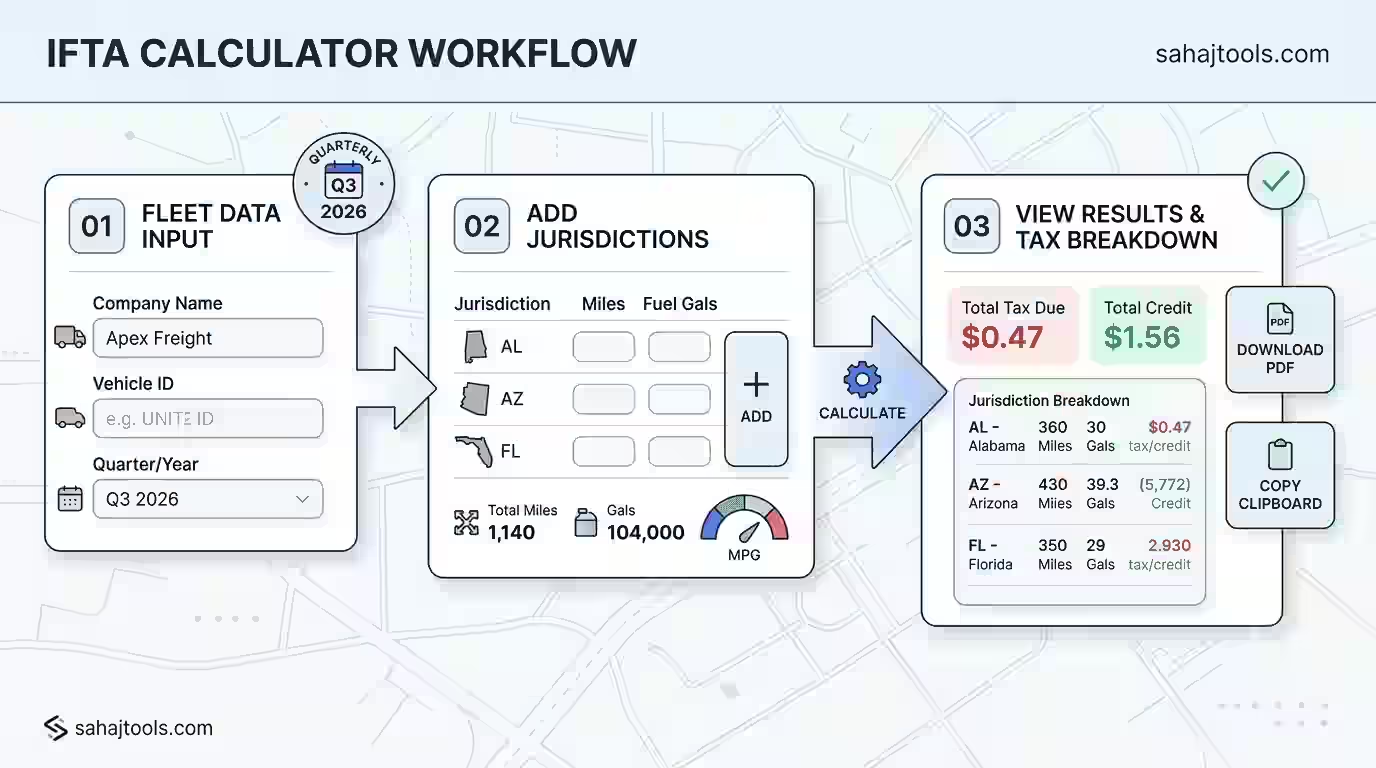
- Click Calculate IFTA Tax to see your fleet MPG, taxable gallons by jurisdiction, and net tax due or credit owed.
How IFTA Tax Is Calculated
The IFTA tax due calculator formula works in four steps, applied once per jurisdiction and then summed:
- Total Fleet MPG = Total Miles Traveled (all jurisdictions) ÷ Total Gallons Purchased (all jurisdictions)
- Taxable Gallons per jurisdiction = Miles Traveled in that jurisdiction ÷ Fleet MPG
- Tax Paid per jurisdiction = Gallons Purchased in that jurisdiction × that jurisdiction’s tax rate
- Net Tax Due per jurisdiction = (Taxable Gallons × tax rate) − Tax Paid
Worked example: A carrier drives 4,000 miles total and buys 615 gallons of diesel across the quarter, giving a fleet MPG of 6.5. In Texas, the truck drove 1,500 miles and bought 200 gallons at $0.20/gallon. Taxable gallons for Texas = 1,500 ÷ 6.5 = 230.8 gallons. Tax owed on those taxable gallons = 230.8 × $0.20 = $46.16. Tax already paid at the pump = 200 × $0.20 = $40.00. Net tax due to Texas = $6.16. Repeat this per jurisdiction, then sum every jurisdiction’s net figure for the quarter’s total liability or credit.
What the Result Means
A positive net tax due means you drove more miles in that jurisdiction than your fuel purchases there covered — you owe the difference to that state. A negative figure means you bought more fuel there than you burned driving through it, which generates a credit applied against jurisdictions where you owe. Your base jurisdiction nets all of these figures together on your quarterly IFTA return; you don’t pay each state separately.
Worked Examples Across Different Fleet Profiles
Single owner-operator, regional routes: 8,200 total miles, 1,050 gallons purchased, fleet MPG of 7.8. Driving mostly in two adjoining states with similar tax rates typically produces a small net due in the higher-mileage state and a small credit in the other.
Mid-size fleet, long-haul: 42,000 total miles across six jurisdictions, 5,900 gallons purchased. Wide swings in state tax rates (some states tax diesel well above $0.30/gallon, others under $0.20) mean the net due can vary sharply by jurisdiction even when miles are evenly spread.
Seasonal hauler, propane-fueled fleet: Lower total gallons and a fuel type with its own tax rate table — the calculator applies the fuel-type-specific rate row rather than a blended average, which matters most for fleets running mixed fuel types across their trucks.
Factors That Affect Your IFTA Tax Due
- Tax rate changes each quarter — IFTA jurisdiction rates are published and updated quarterly; using a stale rate produces an incorrect net due.
- Fleet MPG accuracy — a single mis-entered mileage or gallon figure skews taxable gallons for every jurisdiction, not just one.
- Fuel type — diesel, gasoline, and alternative fuels (propane, CNG, LNG) each carry separate jurisdiction rate tables.
- Non-IFTA miles and exempt fuel — trip permit miles, off-road use, and certain exempt purchases should be excluded before totals are entered.
- Rounding conventions — some jurisdictions require gallons rounded to three decimal places; small rounding differences compound across many jurisdiction rows.
IFTA Filing: Important Notes
This calculator provides an estimate based on standard IFTA reporting formulas and the tax rates you enter. It is not a substitute for professional tax advice, and it does not file your return. Always verify current jurisdiction tax rates against the official IFTA quarterly tax rate matrix, published by the International Fuel Tax Association, before submitting your return. Your base jurisdiction’s tax authority is the final authority on your actual liability, penalties, and filing deadlines.
Regional Notes
IFTA covers the 48 contiguous U.S. states and 10 Canadian provinces. Jurisdiction tax rates are set individually by each member state or province and published quarterly by the IFTA Inc. rate matrix. If your fleet operates in Alaska, Hawaii, or outside IFTA member jurisdictions, those miles and fuel purchases fall outside standard IFTA reporting and are handled separately.
Frequently Asked Questions
Divide total fleet miles by total gallons purchased to get fleet MPG, then for each jurisdiction divide that jurisdiction's miles by fleet MPG to get taxable gallons, multiply by the jurisdiction's tax rate, and subtract tax already paid at the pump there.
Carriers based in an IFTA member jurisdiction file one quarterly return with their base jurisdiction, which then distributes the net tax owed or credit due across every jurisdiction traveled.
All miles driven in IFTA member jurisdictions count, including loaded, empty, and personal-use miles in a qualified motor vehicle — trip-permitted or non-IFTA miles are generally excluded.
Fuel purchased and placed into the tank of a qualified motor vehicle counts, provided you retain receipts showing date, seller, gallons, fuel type, and vehicle unit number.
Divide the miles driven in a specific jurisdiction by your fleet's overall average MPG for the quarter — that gives the gallons attributable to that jurisdiction for tax purposes.
Fleet MPG is total miles traveled across all jurisdictions divided by total gallons of fuel purchased across all jurisdictions during the same quarter — it's a single blended figure, not calculated per truck.
Total your miles and fuel by jurisdiction, calculate net tax due or credit per jurisdiction using your fleet MPG, then submit the combined return and any payment to your base jurisdiction by the quarterly deadline.
Net tax due per jurisdiction equals (miles in that jurisdiction ÷ fleet MPG × tax rate) minus (gallons purchased in that jurisdiction × tax rate).
If your calculated tax paid exceeds tax owed in a jurisdiction, that produces a credit, which offsets amounts due in other jurisdictions on the same return; a net credit across all jurisdictions typically results in a refund or carryforward.
The 48 contiguous United States and 10 Canadian provinces are IFTA member jurisdictions; each has its own published quarterly tax rate.
Ready to Calculate Your IFTA Tax?
Enter your jurisdiction miles and fuel purchases above to get an accurate breakdown of your quarterly IFTA tax due in seconds.
Last Update: August 2026