
Table of Contents
ToggleSpeedometer Calculator: Speed, Distance, Time, Calibration & GPS Comparison
A speedometer calculator solves the two problems that come up most often once you’ve changed a tire size, swapped an axle ratio, or just want to double-check what your dashboard is telling you: what your actual speed is when your indicated speed can’t be trusted, and how to convert between mph, km/h, m/s, and knots without doing the math by hand. This tool covers seven related jobs — speed, distance, time, calibration, tire-change impact, gear ratio correction, and GPS comparison — because they all draw from the same handful of variables: tire diameter, RPM, gear ratio, and time.
Speedometer Calculator
Speed · Distance · Time · Calibration · GPS Comparison
Speed Calculator
Calculate average speed from distance and time. Speed = Distance ÷ Time
Enter the total distance traveled
h
m
s
Distance Calculator
Calculate distance from speed and time. Distance = Speed × Time
h
m
s
Time Calculator
Calculate travel time from distance and speed. Time = Distance ÷ Speed
Speedometer Calibration
Find your actual speed after changing tire size. Actual Speed = Indicated Speed × (New Tire Diameter ÷ Original Tire Diameter)
How to get tire diameter: For a tire labeled 225/55R17, the diameter = 2 × (225 × 0.55 / 25.4) + 17 = 26.7 inches. Use the helper below or enter directly.
inches
📐 Tire Size Helper (P-Metric to Diameter)
Tire Size Change Impact
Analyze how a tire size change affects speedometer reading, odometer, and circumference.
Width (mm) / Aspect Ratio / Rim (in)
Width (mm) / Aspect Ratio / Rim (in)
Gear Ratio / Speedometer Correction
Calculate the required speedometer drive gear teeth when changing axle ratio or tire size.
Formula: Driven Gear Teeth = (Drive Gear Teeth × Axle Ratio × Tire Revs/Mile). Tire Revs/Mile = 20,168 ÷ Tire Diameter (inches).
Teeth on the transmission output shaft gear
e.g. 3.08, 3.55, 3.73, 4.10
Overall tire diameter in inches
If replacing the axle ratio — for comparison
GPS Speed Comparison
Compare your speedometer reading against GPS speed to find calibration error and offset.
mph
Reset Calculator?
This will clear all inputs, results, and saved session data for this tab.
To correct a speedometer after a tire size change, multiply your indicated speed by the ratio of the new tire diameter to the original tire diameter (Actual Speed = Indicated Speed × New Diameter ÷ Original Diameter). Larger tires cause the speedometer to under-read actual speed; smaller tires cause it to over-read
related automotive & transport calculators
Why Your Speedometer Stops Being Accurate
A stock speedometer is calibrated to one specific tire diameter and one specific axle (final drive) ratio. It doesn’t measure road speed directly — it counts driveshaft or wheel-sensor rotations and converts that count to a speed reading using the assumption that your tires are still the size they were when the vehicle left the factory. Change either of those two things and the assumption breaks, which is why a speedometer reads wrong after a tire upgrade, a gear swap, or certain drivetrain repairs.
Here’s the mechanism: a larger tire covers more ground per revolution than a smaller one. If your speedometer is still counting revolutions as though you’re on the original tire diameter, it under-reports your real speed — you’re going faster than the dash says. A smaller tire does the opposite: fewer revolutions per mile than the speedometer expects, so it over-reports. The same distortion happens with axle ratio changes, because a numerically higher axle ratio (say, going from 3.08 to 3.73) increases revolutions per mile at a given road speed, and a numerically lower one decreases it.
This isn’t a cosmetic issue. An inaccurate speedometer means your actual speed can drift meaningfully from posted limits even when you’re “driving to the number,” and it also throws off your odometer, which affects mileage-based maintenance intervals, resale mileage disclosures, and warranty tracking.
How to Use This Calculator
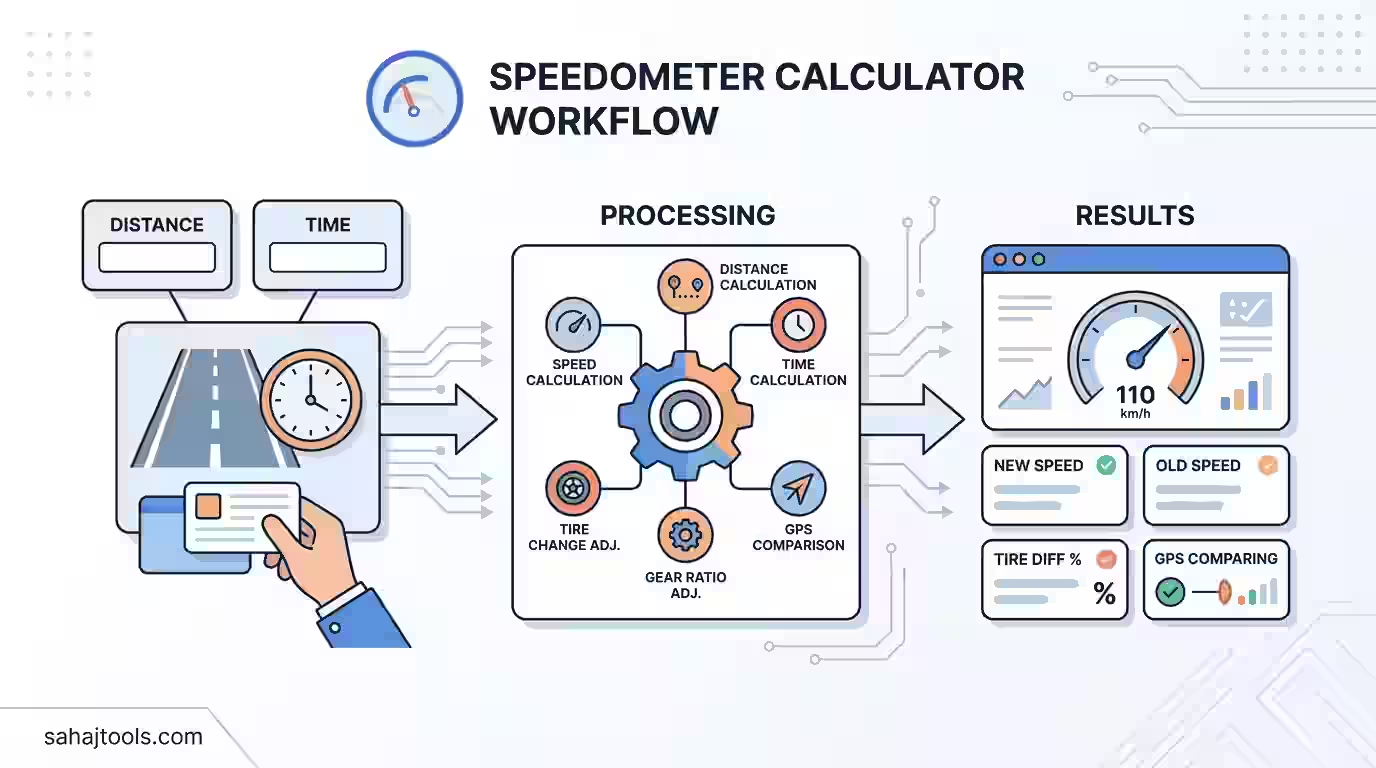
The tool is organized into seven tabs, each solving a specific piece of the speed/distance/time/calibration puzzle:
- Speed — enter distance and time to get average speed, with a selectable result unit (mph, km/h, m/s, or knots).
- Distance — enter speed and time to get distance traveled (Distance = Speed × Time).
- Time — enter distance and speed to get travel time (Time = Distance ÷ Speed).
- Calibration — enter your original tire diameter, new tire diameter, and indicated speed to get your actual speed after a tire size change. A built-in tire size helper converts a P-metric size label (like 225/55R17) into a diameter in inches.
- Tire Change — enter both tire sizes in full P-metric format (width/aspect ratio/rim diameter) to see the combined effect on speedometer reading, odometer accuracy, and tire circumference.
- Gear Ratio — enter drive gear teeth, axle ratio, and tire diameter to calculate the driven gear teeth needed for accurate speedometer readings after an axle ratio or tire size change.
- GPS Compare — cross-check your speedometer’s indicated speed against GPS-tracked speed for a real-world calibration check, separate from the mechanical tire/gear math.
Pick the tab that matches what you already know and what you’re trying to find — the calculator only asks for the inputs that specific function needs.
Speed, Distance, and Time: The Core Relationship
Every distance calculator from speed and time, and every vehicle speed calculator, ultimately rests on one relationship:
Speed = Distance ÷ Time
Rearranged, that gives you the other two functions:
- Distance = Speed × Time
- Time = Distance ÷ Speed
Worked example (Speed): You drive 180 miles in 3 hours and 15 minutes (3.25 hours). Speed = 180 ÷ 3.25 = 55.4 mph.
Worked example (Distance): You maintain 65 mph for 2 hours and 40 minutes (2.667 hours). Distance = 65 × 2.667 = 173.3 miles.
The calculator handles unit conversion automatically, so you can mix input units (say, kilometers and minutes) and still get a clean mph, km/h, m/s, or knots result — useful if you’re converting a marine or aviation speed reading, or comparing a foreign vehicle’s spec sheet to a domestic one.
Unit | Best Used For | Conversion to mph |
mph | US road speeds | 1 mph (baseline) |
km/h | Metric road speeds, most countries outside the US | 1 km/h ≈ 0.621 mph |
m/s | Physics/engineering calculations, sensor data | 1 m/s ≈ 2.237 mph |
knots | Marine and aviation speed | 1 knot ≈ 1.151 mph |
Speedometer Calibration After a Tire Size Change
This is the core function behind a speedometer calibration calculator and a speedometer correction calculator: figuring out your actual speed when you know your tire diameter changed and your indicated speed is no longer trustworthy.
Formula:
Actual Speed = Indicated Speed × (New Tire Diameter ÷ Original Tire Diameter)
Every variable, defined:
- Indicated Speed — what your speedometer displays, in mph or km/h.
- Original Tire Diameter — the overall diameter, in inches, of the tire your speedometer was calibrated for (usually the factory-spec size).
- New Tire Diameter — the overall diameter, in inches, of the tire currently mounted.
If you only have a P-metric tire size label (like 225/55R17) rather than a diameter in inches, convert it first:
Tire Diameter (in) = 2 × (Width_mm × Aspect_Ratio% / 25.4) + Rim_Diameter_in
For a 225/55R17 tire: 2 × (225 × 0.55 / 25.4) + 17 = 2 × 4.874 + 17 ≈ 26.7 inches.
Worked example — larger tires:
Original tire diameter 26.7 in, new tire diameter 28.2 in, indicated speed 60 mph.
Actual Speed = 60 × (28.2 ÷ 26.7) = 60 × 1.056 = 63.4 mph
Your speedometer is under-reading by about 3.4 mph at that speed — you’re actually going faster than the dash shows.
Worked example — smaller tires:
Original tire diameter 27.5 in, new tire diameter 26.0 in, indicated speed 70 mph.
Actual Speed = 70 × (26.0 ÷ 27.5) = 70 × 0.9455 = 66.2 mph
Here the speedometer over-reads by roughly 3.8 mph — you’re actually going slower than it claims, which matters if you’re trying to hit a merge speed or match traffic flow.
Tire Size Change Impact: What Actually Shifts
A speedometer difference tire size calculator function looks at the full P-metric comparison — width, aspect ratio, and rim diameter on both the original and new tire — rather than just a single diameter number. That matters because two tires with the same overall diameter but different width/aspect combinations can still shift your effective gearing slightly, and because most people shopping for a tire size speedometer calculator are working from the size labels on the tire sidewall, not a diameter they’ve already calculated.
Changing tire size affects three linked things at once:
- Speedometer reading accuracy — as shown above, the diameter ratio directly sets your speed correction factor.
- Odometer accuracy — since the odometer counts the same revolutions the speedometer uses, it drifts by the same percentage. A tire that’s 5% larger in diameter means your odometer under-counts mileage by roughly 5%.
- Tire circumference — larger diameter means larger circumference, which means fewer revolutions per mile, which is the root cause of both effects above.
Comparison — stock tire size vs. aftermarket tire size:
Stock: 225/55R17 (26.7 in) | Aftermarket: 245/50R17 (26.9 in) | |
Diameter | 26.7 in | 26.9 in |
Diameter change | Baseline | +0.7% |
Speedometer at true 65 mph | Reads 65 mph | Reads ~64.5 mph |
Odometer over 1,000 real miles | Reads 1,000 mi | Reads ~993 mi |
A 0.7% diameter change is a common outcome when people go slightly wider and lower-profile to keep the same overall rolling diameter — which is exactly why checking the actual diameter, not just the tire label, is worth the extra step before assuming “no difference.”
Gear Ratio and Speedometer Correction
If you’ve changed your axle (rear end) ratio — a common move when upgrading for towing capacity or performance — your speedometer error comes from a different source than tire size, and a gear ratio speed calculator or RPM to speed calculator handles it differently.
Formula:
Driven Gear Teeth = Drive Gear Teeth × Axle Ratio × Tire Revolutions per Mile
Where:
Tire Revolutions per Mile = 20,168 ÷ Tire Diameter (inches)
Every variable, defined:
- Drive Gear Teeth — the number of teeth on the transmission output shaft gear (a fixed mechanical component).
- Axle Ratio — the final drive/axle ratio, e.g. 3.08, 3.55, 3.73, or 4.10. Higher numbers mean more engine RPM per mph of road speed.
- Tire Diameter — overall tire diameter in inches.
- Driven Gear Teeth — the speedometer drive gear tooth count needed to keep the speedometer accurate at the new axle ratio and/or tire size.
Worked example:
Drive gear teeth = 8, new axle ratio = 3.73 (up from 3.08), tire diameter = 26.7 in.
Tire Revolutions per Mile = 20,168 ÷ 26.7 ≈ 755.4
Driven Gear Teeth = 8 × 3.73 × 755.4 ÷ 1,000 ≈ 22.5 teeth (rounded to the nearest available gear, typically 22 or 23)
This calculation matters because engine RPM at a given road speed is also a direct function of axle ratio and tire diameter — the same inputs that drive the gear correction also tell you how much your cruising RPM will change after the swap, which is often the real reason someone goes looking for this calculation in the first place.
GPS Speed Comparison: A Real-World Check
Separate from the mechanical tire/gear math, a browser-based GPS speedometer answers “how fast am I going” using satellite positioning rather than driveshaft revolutions, so it isn’t affected by tire size or axle ratio at all. Comparing GPS speed against your dash reading is the fastest way to check my speed online without doing any tire-diameter math — it’s a direct measurement, not a calculated correction.
Keep two things in mind when comparing the two: GPS speed accuracy depends on signal quality and can lag slightly at very low speeds or in dense urban canyons, and it measures ground speed over a short time interval rather than instantaneous wheel speed. For a quick sanity check on whether your speedometer needs calibration, a GPS comparison run at steady highway speed is more reliable than one taken during stop-and-go driving.
Common Mistakes to Avoid
- Using tire section width instead of overall diameter. The number on the tire sidewall you actually need for calibration is the full diameter, not the width in millimeters — use the P-metric conversion formula above if you only have the label.
- Forgetting the odometer drifts too. People correct their speedometer reading mentally but keep trusting the odometer for maintenance intervals, which compounds the error over thousands of miles.
- Assuming “close enough” tire sizes cancel out. A 1–2% diameter difference sounds trivial but adds up to a full mph or more of error at highway speeds — worth calculating rather than guessing.
- Skipping the axle ratio correction after a regear. Tire size changes get the calibration attention; axle ratio swaps are just as common a cause of speedometer error and are often overlooked.
A Note on Accuracy
This calculator uses standard mechanical formulas for tire diameter, gear ratio, and speed correction. Results are estimates based on the inputs provided — actual speedometer behavior can vary slightly by vehicle due to sensor placement, electronic speedometer calibration software, and manufacturer-specific correction factors. If your vehicle’s actual speed matters for legal compliance (posted speed limits) or safety, verify with a GPS speed check or a professional calibration rather than relying solely on calculated correction factors.
Frequently Asked Questions
Speed from tire size and gear ratio is derived from engine RPM: Speed (mph) = (Engine RPM × Tire Diameter) ÷ (Axle Ratio × 336), where tire diameter is in inches. This backs out road speed using the same revolutions-per-mile relationship the gear ratio calculator uses in reverse.
Multiply your indicated speed by the ratio of new tire diameter to original tire diameter: Actual Speed = Indicated Speed × (New Diameter ÷ Original Diameter). Larger tires mean your actual speed is higher than indicated; smaller tires mean it's lower.
Your speedometer counts wheel or driveshaft revolutions and converts that count to a speed reading based on the tire diameter and axle ratio it was originally calibrated for. Change either one — larger/smaller tires or a different axle ratio — and the reading drifts from true road speed.
The effect is proportional to the percentage change in diameter. A tire that's 5% larger in overall diameter causes the speedometer to under-read actual speed by roughly 5% — so at a true 60 mph, it would show about 57 mph.
Vehicle Speed (mph) = (Engine RPM × Tire Diameter in inches) ÷ (Axle Ratio × 336). The constant 336 accounts for unit conversion between RPM, tire circumference, and miles per hour.
Run a GPS speed comparison at a steady highway speed and check for a consistent gap between GPS speed and your dash reading. If you've recently changed tire size or axle ratio, calculate the expected error using the diameter-ratio formula and compare it to what you're observing.
Indicated speed is the number displayed on your speedometer, based on revolution counting and the vehicle's original calibration. Actual speed is your true road speed, which only matches the indicated speed when tire diameter and axle ratio are still at factory specification.
Yes — combined with engine RPM, tire diameter and axle ratio fully determine road speed through the formula Speed = (RPM × Tire Diameter) ÷ (Axle Ratio × 336). This is the same relationship used for gear ratio correction after a drivetrain change.
At minimum mph and km/h, since those cover nearly all road speed use cases; m/s for engineering or physics contexts and knots for marine/aviation use round out full unit coverage for cross-referencing speed data from different sources.
A browser-based GPS speedometer uses your device's location services to track position changes over short time intervals and calculates speed directly from that movement — no tire diameter, gear ratio, or mechanical calibration involved, which makes it a useful independent check against your dash reading.
Try the calculator above — switch to the Calibration tab if you’ve recently changed tire size, or GPS Compare for a quick real-world check against your current speedometer reading.
Last Update: August 2026