
Table of Contents
ToggleAggregate Calculator: Estimate Material Tons Instantly
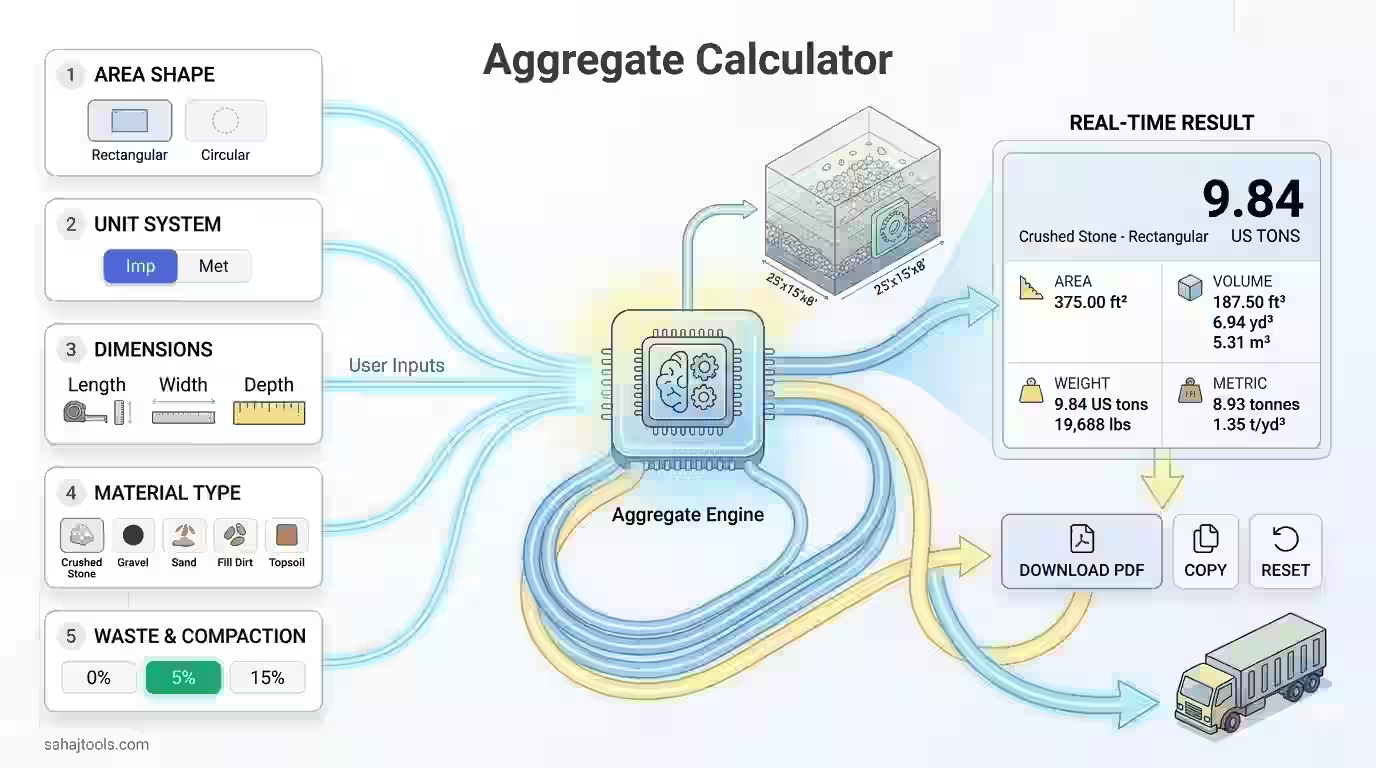
Ordering gravel, crushed stone, or sand for a driveway, patio base, or landscaping bed only works out if you order the right amount. Too little and your project stalls mid-delivery; too much and you’re paying to haul away leftover rock. An aggregate calculator solves this by converting your area’s length, width, and depth into the cubic yards and tons you actually need to order — before you ever call a supplier.
This tool works for any loose bulk material: crushed stone, gravel, sand, pea gravel, limestone, granite, river rock, fill dirt, topsoil, recycled concrete, or road base (DGA). Enter your area shape, dimensions, and material type, and it returns both volume and tonnage in seconds.
Aggregate Calculator
Accurate volume & tonnage estimation for construction projects
1 Area Shape
2 Unit System
3 Dimensions
ft
ft
ft
in
4 Material Type
t/yd³
5 Waste & Compaction Factor
Add extra material to account for compaction & waste
Calculation Results
Crushed Stone — Rectangular
0US tons
📐
Area—
📦
Volume (ft³)—
📏
Volume (yd³)—
🌐
Volume (m³)—
⚖️
Weight (US Tons)—
🏋️
Weight (Metric Tonnes)—
💪
Weight (lbs)—
🔢
Material Density—
View Calculation Breakdown
Results are estimates for planning purposes. Always verify with your supplier and add 5–10% buffer for compaction and waste. Densities may vary by source, moisture content, and gradation.
⚠️
Reset Calculator?
All inputs and results will be cleared. This cannot be undone.
✓ Copied to clipboard
related construction & material calculator
How the Aggregate Calculator Works
Every aggregate estimate comes down to one core formula: area × depth = volume, then volume × material density = weight.
For a rectangular area:
Volume (cubic feet) = Length (ft) × Width (ft) × Depth (ft)
Since depth is almost always measured in inches, divide it by 12 first to convert to feet. Then convert cubic feet to cubic yards by dividing by 27 (there are 27 cubic feet in one cubic yard):
Cubic Yards = Cubic Feet ÷ 27
For a circular area (a fire pit ring, tree well, or round patio base), swap the area formula:
Volume (cubic feet) = π × radius² × Depth (ft)
Once you have cubic yards, multiply by the material’s density (measured in tons per cubic yard) to get the tonnage you need to order:
Tons Needed = Cubic Yards × Material Density (t/yd³)
This calculator handles both imperial units (feet and inches) and metric units (meters and centimeters), so the same coverage-depth logic applies regardless of which system you’re working in.
Worked Example
Say you’re building a gravel driveway that’s 40 feet long and 12 feet wide, with a compacted depth of 4 inches, using standard crushed stone (density: 1.35 tons per cubic yard).
- Convert depth to feet: 4 in ÷ 12 = 0.333 ft
- Calculate volume: 40 ft × 12 ft × 0.333 ft = 160 cubic feet
- Convert to cubic yards: 160 ÷ 27 = 5.93 cubic yards
- Calculate tonnage: 5.93 yd³ × 1.35 t/yd³ = 8.0 tons of crushed stone
Add a 10% waste and compaction factor for a real-world order, and that climbs to roughly 8.8 tons — a sensible cushion for settling, spillage, and an uneven subgrade.
Material Density & Weight-Per-Yard Reference Table
Density varies significantly by material, which is why the same cubic yardage can mean very different tonnage depending on what you’re ordering.
Material | Density (tons/yd³) | Typical Use |
Topsoil | 1.08 | Garden beds, lawn leveling |
Fill Dirt | 1.15 | Grading, backfill |
River Rock | 1.29 | Decorative beds, drainage |
Crushed Stone | 1.35 | Driveways, walkways |
Recycled Concrete | 1.35 | Sub-base, driveway fill |
Gravel | 1.40 | General landscaping, drainage |
Pea Gravel | 1.40 | Pathways, playgrounds |
Road Base (DGA) | 1.48 | Compacted driveway base, sub-base |
Limestone | 1.50 | Driveways, gravel roads |
Granite | 1.54 | Decorative aggregate, hardscaping |
If your supplier quotes a material not listed here — or specifies a density that differs due to local sourcing or moisture content — use the calculator’s custom density field to enter their exact figure for a more precise tonnage.
Delivery vs. Bagged Material: Which Should You Order?
For small jobs under half a cubic yard — a few garden beds or a small drainage fix — bagged aggregate from a hardware store is usually more practical than scheduling bulk delivery. Bagged crushed stone or gravel typically comes in 0.5 cubic foot units, so divide your total cubic feet by 0.5 to estimate the bag count.
For anything approaching a full cubic yard or more — driveways, larger patios, sub-base work — bulk delivery from a landscape supply yard or quarry is almost always cheaper per ton and saves multiple store trips. Most suppliers set a minimum delivery order (often 2–5 tons), so it’s worth confirming that threshold before finalizing your tonnage.
Compaction: Why Base Materials Need Extra Depth
If you’re using road base, DGA, crusher run, or recycled concrete as a compacted sub-base, account for the fact that loose material compacts down once it’s tamped or rolled — typically 15–25% depending on the material and moisture content. That means the loose volume you order needs to exceed your finished, compacted depth target. The calculator’s built-in waste and compaction factor (0%, 5%, 10%, or 15%) handles this directly: for compacted base layers, lean toward the 10–15% end rather than 0%.
Crushed Stone vs. Gravel vs. River Rock: Choosing the Right Material
- Crushed stone has angular edges that lock together under compaction, making it the standard choice for driveway sub-bases and load-bearing surfaces.
- Gravel and pea gravel are rounder and looser, better suited to drainage beds, French drains, and walkways where compaction isn’t the goal.
- River rock is a decorative, larger-format stone typically used in landscaping beds, dry creek beds, and drainage features rather than structural applications.
- Recycled concrete performs similarly to crushed stone for sub-base work at a lower cost, making it a common budget-conscious substitute.
If you’re also estimating fill dirt for a grading project alongside your aggregate order, a dedicated fill dirt calculator can help you plan both materials in the same trip. Similarly, if your project includes a poured concrete component, a concrete calculator handles that volume separately from the aggregate base beneath it.
Common Mistakes to Avoid
- Forgetting the depth conversion. Depth is entered in inches but the formula needs feet — skipping this step is the single most common calculation error.
- Using the wrong density for the material. Topsoil and granite differ by nearly 50% in weight per cubic yard; guessing instead of checking will throw off your order significantly.
- Ignoring compaction for base materials. Ordering exactly your finished depth in road base or crusher run will leave you short once it’s compacted.
- Not accounting for irregular areas. For an L-shaped or curved space, break it into rectangular or circular sections and calculate each separately, then add the totals.
other Related Construction & Material calculators
If you are working on a larger construction project, you might also find these tools helpful:
- Asphalt Driveway Cost Calculator: Estimate the pricing for paving over your aggregate base.
- Concrete Block Calculator: Perfect for calculating the perimeter walls or retaining structures surrounding your gravel area.
- Stone Calculator: A specialized tool for larger decorative boulders or wall stones.
Frequently Asked Questions
Multiply your area's length by width by depth (converted to feet) to get cubic feet, divide by 27 for cubic yards, then multiply by the material's density to get tons.
Multiply cubic yards by the material's density in tons per cubic yard. Since density varies by material — from about 1.08 t/yd³ for topsoil to 1.54 t/yd³ for granite — there's no single universal conversion factor.
Weight equals volume (in cubic yards) multiplied by density (in tons per cubic yard). This calculator applies that formula automatically once you select your material type.
Use the material-specific density from your supplier if available, since local sourcing and moisture content cause real variation. Otherwise, the reference table above gives standard industry averages for common materials.
It depends on your driveway's length, width, and desired depth — typically 4–6 inches of compacted base material. Enter your dimensions into the calculator to get an exact cubic yard and tonnage figure.
Add 5–10% for general spillage and settling, or 10–15% if you're compacting a base layer like road base or crusher run, since compaction reduces the material's finished depth.
Last Update: July 2026