
Table of Contents
ToggleAlimony Calculator Alberta: Estimate Your Spousal Support
Going through a separation or divorce brings enough uncertainty without having to guess at the financial side of things. An alimony calculator alberta residents can rely on takes the guesswork out of one of the biggest questions in any separation: how much spousal support will I pay in Alberta, or how much spousal support will I receive in Alberta. Whether you’re the spouse who may pay support or the one who may receive it, this tool applies the Spousal Support Advisory Guidelines (SSAG) — the framework Alberta courts use as a starting point — to give you a realistic estimate based on your own numbers. For anyone researching spousal support after divorce alberta, this tool applies the same logic real negotiations rely on. It’s not a legal document, but it is a grounded, informed starting point before you sit down with a lawyer or begin negotiations.
⚖
Alberta Spousal Support
Calculator — Based on SSAG Guidelines
Free & Accurate
1Income
2Marriage
3Children
4Results
✓
Support Calculation Results
—
Monthly Support — Low
—
Minimum of range
Monthly Support — Mid
—
Midpoint (recommended)
Monthly Support — High
—
Maximum of range
Annual Support (Mid)
—
Based on midpoint
⏳
Estimated Support Duration
—
—
🔍 Calculation Breakdown
ℹ️ Assumptions & Methodology
⚠️ Important Disclaimer: This calculator provides estimates based on the Spousal Support Advisory Guidelines (SSAG). Results are not legal advice. Actual support amounts are determined by a court or negotiated agreement. Always consult a qualified Alberta family law lawyer for your specific situation.
⚠️
Reset Calculator?
This will clear all inputs, results, and saved session data. This action cannot be undone.
related finance & Business calculators
How Spousal Support Alberta Calculations Work
Alberta doesn’t have its own standalone spousal support formula, so Alberta alimony guidelines point directly to the national framework below. Instead, courts and family law lawyers across the province apply the Spousal Support Advisory Guidelines, a national framework developed to bring more consistency and predictability to support awards under the Divorce Act and Alberta’s Family Law Act. This alberta alimony support calculator applies the same two SSAG formulas that guide real negotiations and court decisions.
Which formula applies depends on one factor: whether there are dependent children from the relationship.
Without Child Support Formula
When there are no dependent children, SSAG calculates support based primarily on the income difference between spouses and the length of marriage or cohabitation. The guideline range for the monthly amount is generally derived by applying a percentage — typically between 1.5% and 2% per year of cohabitation, up to a ceiling — to the gross income difference between the two spouses. Duration is calculated the same way: roughly 0.5 to 1 year of support for every year of the relationship, though marriages of 20 years or longer, or where the recipient’s age plus years of marriage adds up to 65 or more, can result in indefinite (undetermined duration) support.
With Child Support Formula
When dependent children are involved, the calculation shifts. Rather than comparing gross incomes directly, it works from each spouse’s Individual Net Disposable Income (INDI) — income remaining after child support obligations, taxes, and certain deductions are accounted for. The formula then aims at equalization of net incomes between the households within a set percentage range, recognizing that child-rearing responsibilities affect each spouse’s actual financial capacity differently than in a childless separation.
As an SSAG calculator Alberta users can trust, both formulas produce a range, not a single number — SSAG intentionally builds in flexibility so that a judge, mediator, or the spouses themselves can land on a figure appropriate to their specific circumstances, rather than a rigid mandated amount.
How to Use This Alberta Spousal Support Calculator
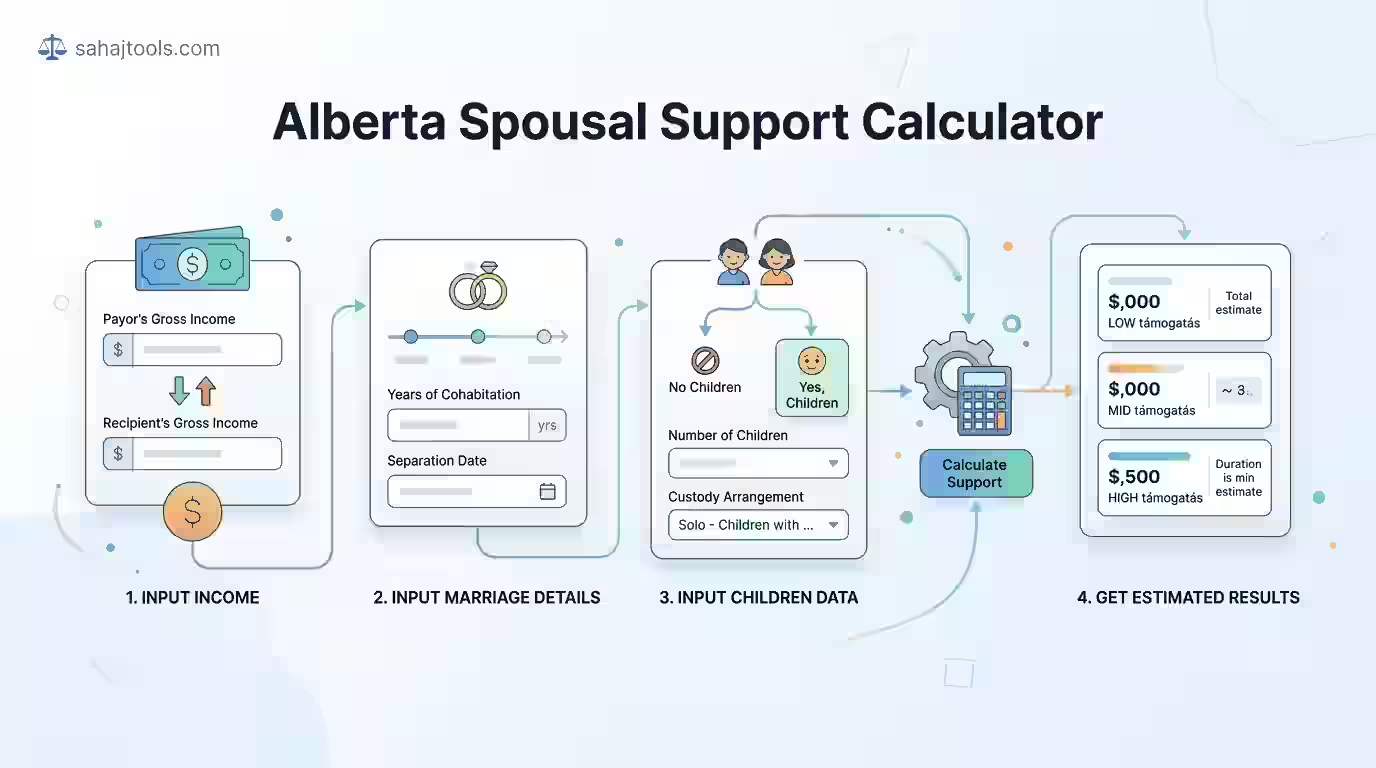
This spousal support calculator alberta tool is built around the actual inputs SSAG requires, so your estimate from this Alberta divorce support calculator reflects the same variables a court would consider:
- Enter both spouses’ gross annual income — the payor’s income and the recipient’s income, before taxes. This income difference drives the entire calculation.
- Enter years of cohabitation — count the full cohabitation period from when you started living together, not just the marriage date, since Alberta family law recognizes pre-marital cohabitation in the total relationship length.
- Select relationship type — married or common-law (adult interdependent partner). Alberta applies similar SSAG principles to both, since the Family Law Act extends support obligations to adult interdependent partners, not just married spouses.
- Enter the recipient’s age at separation — this factors into whether the relationship might qualify for indefinite support under the Rule of 65.
- Indicate whether there are dependent children from the relationship — this single input determines which of the two SSAG formulas the alimony and spousal support calculation will use.
- Review your results — an estimated monthly support range and, functioning as a support duration calculator, an estimated duration range, both generated instantly.
Because this is a spousal maintenance calculator Alberta built on SSAG’s advisory (not legally binding) framework, treat the output as a well-informed estimate rather than a guaranteed outcome.
Worked Example: Alberta Spousal Support Estimate
To see the alberta child support calculator logic and the without-child formula in action, consider a straightforward example:
- Payor’s gross annual income: $90,000
- Recipient’s gross annual income: $35,000
- Years of cohabitation: 12
- No dependent children
- Recipient’s age at separation: 42
With a $55,000 income difference and 12 years together, the without-child-support formula applies a percentage range (roughly 18–24% given the 12-year relationship length) to that income gap, producing an estimated monthly support amount calculator output, the core figure most users want, in the range of roughly $825 to $1,100. Duration, calculated at 0.5 to 1 year per year of relationship, suggests a support duration of approximately 6 to 12 years — well short of the 20-year or Rule of 65 threshold that would trigger indefinite support in this case.
If this same couple had dependent children, the calculation would instead start from each spouse’s net disposable income after child support is factored in, which typically produces a different — and often lower — support figure, since the with-child formula accounts for the recipient already receiving child support alongside spousal support.
Alberta's Legal Framework for Spousal Support
Spousal support in Alberta sits at the intersection of two pieces of legislation, and which one applies depends on your relationship type. Under the family law act Alberta spousal support framework, married couples pursuing spousal support typically do so under Divorce Act spousal support provisions, while common-law couples — recognized in Alberta as adult interdependent partners under adult interdependent partner support rules — rely on the Family Law Act, Alberta’s provincial legislation covering support obligations outside of marriage. Both statutes point to the same SSAG framework for calculating amount and duration, which is why this tool applies consistent logic regardless of relationship type.
Claims are generally heard in the Court of King’s Bench of Alberta, and while SSAG provides the calculation framework nearly every family law professional in the province uses, it remains advisory rather than legislated — a judge retains discretion to depart from the suggested range where circumstances warrant it. For current statutory text or to confirm how the guidelines apply to your specific situation, Alberta.ca and a licensed family law professional remain the authoritative sources.
Support Duration and the Rule of 65
One of the more misunderstood aspects of Alberta alimony is when indefinite spousal support applies rather than a time-limited award. Under SSAG, a relationship generally qualifies for indefinite (duration not specified) support in two scenarios: when the relationship lasted 20 years or longer, or when the Rule of 65 spousal support threshold applies — meaning the recipient’s age at separation plus the number of years of the relationship adds up to 65 or more. Indefinite doesn’t mean permanent or unchangeable; it means the guidelines don’t assign an automatic end date, leaving duration open to future review as circumstances change, such as retirement, remarriage, or a significant income shift for either spouse.
Is Spousal Support Taxable in Alberta?
Ongoing periodic spousal support qualifies as taxable support, generally counted as taxable income to the recipient, while it’s treated as tax deductible support for the payor under Canadian tax law, provided the payments meet CRA’s definition of a periodic support amount under a written agreement or court order. Lump-sum spousal support payments, by contrast, are typically neither taxable nor deductible. This tax treatment can meaningfully affect the real-world value of a support arrangement, so it’s worth factoring in when comparing a monthly amount against a lump-sum settlement offer.
Common Mistakes to Avoid When Estimating Alberta Spousal Support
- Using net income instead of gross income. SSAG’s without-child formula is built on gross income; substituting net income skews the estimate significantly.
- Ignoring pre-marital cohabitation. Alberta counts the full period of living together, not just the years since the wedding — leaving this out understates relationship length and the resulting support range.
- Treating the guideline range as a guaranteed number. SSAG produces a range for a reason; the final agreed or ordered amount can land anywhere within it based on additional factors a court considers.
- Overlooking that support amounts can be modified. A material change in circumstances — job loss, remarriage, retirement, or a significant income change for either spouse — can be grounds for spousal support modification Alberta courts will consider, so an initial calculation isn’t necessarily the final word for the life of the arrangement.
- Forgetting how child support interacts with spousal support. When both are payable, the two are calculated in a specific sequence (child support is typically determined first), and skipping this step produces an inaccurate spousal support figure.
other finance & banking calculators
Money Market Calculator: Plan your investments alongside spousal support payments. This tool helps you estimate returns on savings or investments, ensuring you can meet financial obligations while growing your wealth.
Frequently Asked Questions
Alberta applies the Spousal Support Advisory Guidelines, which use either the without-child-support formula (based on gross income difference and relationship length) or the with-child-support formula (based on equalizing net disposable income) depending on whether dependent children are involved.
The primary factors are the income difference between spouses, the length of cohabitation (including pre-marital time together), whether dependent children are involved, and the recipient's age relative to the Rule of 65 for indefinite support eligibility.
Alberta uses the same national SSAG formulas applied across Canada: the without-child-support formula for relationships without dependent children, and the with-child-support formula based on Individual Net Disposable Income when children are involved.
Duration under SSAG is typically 0.5 to 1 year of support for every year of the relationship, unless the relationship lasted 20+ years or the Rule of 65 applies, in which case support may be indefinite rather than time-limited.
Periodic monthly spousal support is generally taxable to the recipient and tax-deductible for the payor, while lump-sum spousal support payments are typically not taxable or deductible.
disposable income after child support obligations are factored in, since child-related costs affect each household's real financial capacity.
Both spouses' gross annual income (before taxes) is used as the starting point, with the with-child formula further adjusting for net disposable income after child support.
Support typically becomes indefinite when the relationship lasted 20 years or more, or when the recipient's age at separation plus the length of the relationship totals 65 or more (the Rule of 65).
Yes. Common-law partners, recognized in Alberta as adult interdependent partners under the Family Law Act, can claim spousal support using the same SSAG framework applied to married couples.
When both are payable, child support is generally calculated first, and the spousal support figure is then determined using the with-child-support SSAG formula, which accounts for the recipient's income after child support is factored in.
This calculator gives you an SSAG-based estimate to help you understand the likely range for your situation, but it cannot account for every factor a court or negotiation might weigh — property division, health, employability, or specific hardship circumstances among them. Spousal support outcomes ultimately depend on judicial discretion, negotiated agreement, or the specific facts of your case, so this tool should not be treated as legal advice or a guaranteed outcome. Before finalizing any support arrangement, consult a licensed family law attorney in Alberta who can review your complete circumstances.
If you’re working through the full financial picture of a separation, a combined child support and spousal support calculator view can help you see how both obligations interact.
Last Update: August 2026